Skip to content
  • Categories
  • Recent
  • Tags
  • Popular
  • World
  • Users
  • Groups
Skins
  • Light
  • Brite
  • Cerulean
  • Cosmo
  • Flatly
  • Journal
  • Litera
  • Lumen
  • Lux
  • Materia
  • Minty
  • Morph
  • Pulse
  • Sandstone
  • Simplex
  • Sketchy
  • Spacelab
  • United
  • Yeti
  • Zephyr
  • Dark
  • Cyborg
  • Darkly
  • Quartz
  • Slate
  • Solar
  • Superhero
  • Vapor

  • Default (Cyborg)
  • No Skin
Collapse
Brand Logo

CIRCLE WITH A DOT

  1. Home
  2. Uncategorized
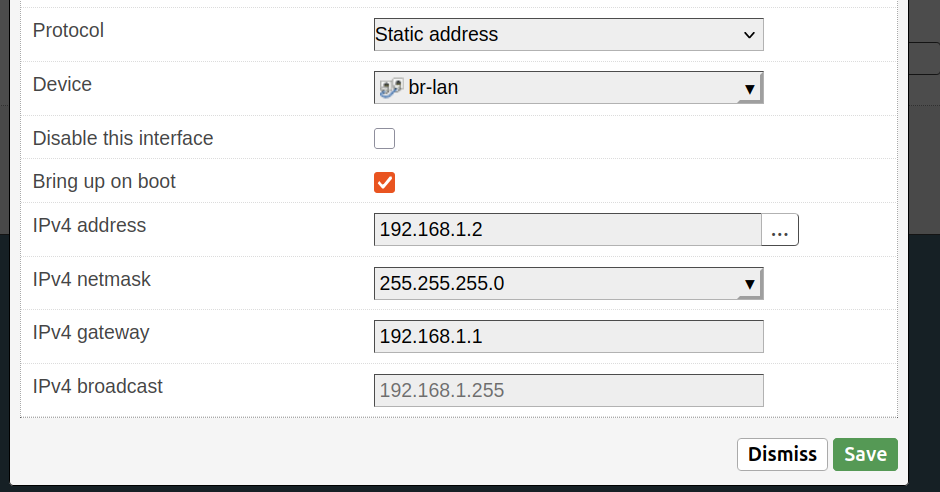
  3. Finally got around to updating my #OpenBSD router (new hardware) pairing it together with an #OpenWRT AP, funnelling everything through a separate #raspberrypi zero running #pihole

Finally got around to updating my #OpenBSD router (new hardware) pairing it together with an #OpenWRT AP, funnelling everything through a separate #raspberrypi zero running #pihole

Scheduled Pinned Locked Moved Uncategorized
openbsdopenwrtraspberrypipihole
13 Posts 8 Posters 0 Views
  • Oldest to Newest
  • Newest to Oldest
  • Most Votes
Reply
  • Reply as topic
Log in to reply
This topic has been deleted. Only users with topic management privileges can see it.
  • bt@mastodon.bsd.cafeB bt@mastodon.bsd.cafe

    Finally got around to updating my #OpenBSD router (new hardware) pairing it together with an #OpenWRT AP, funnelling everything through a separate #raspberrypi zero running #pihole

    Bonus: my Raspberry Pi 400 is now setup with OpenBSD's httpd / relayd - ready to host all of my web projects locally!

    That was sure a lot of buzz words...I'll gather my detailed thoughts and breakdown everything into a blog post soon πŸ˜„

    acirep@mastodon.bsd.cafeA This user is from outside of this forum
    acirep@mastodon.bsd.cafeA This user is from outside of this forum
    acirep@mastodon.bsd.cafe
    wrote last edited by
    #2

    @bt waiting on that blogpost, sounds very interesting!

    1 Reply Last reply
    0
    • bt@mastodon.bsd.cafeB bt@mastodon.bsd.cafe

      Finally got around to updating my #OpenBSD router (new hardware) pairing it together with an #OpenWRT AP, funnelling everything through a separate #raspberrypi zero running #pihole

      Bonus: my Raspberry Pi 400 is now setup with OpenBSD's httpd / relayd - ready to host all of my web projects locally!

      That was sure a lot of buzz words...I'll gather my detailed thoughts and breakdown everything into a blog post soon πŸ˜„

      justine@snac.smithies.me.ukJ This user is from outside of this forum
      justine@snac.smithies.me.ukJ This user is from outside of this forum
      justine@snac.smithies.me.uk
      wrote last edited by
      #3
      Do you have a blog post on your router with configs and such to show new users how to go about setting up their own OpenBSD router ?
      bt@mastodon.bsd.cafeB 1 Reply Last reply
      0
      • justine@snac.smithies.me.ukJ justine@snac.smithies.me.uk
        Do you have a blog post on your router with configs and such to show new users how to go about setting up their own OpenBSD router ?
        bt@mastodon.bsd.cafeB This user is from outside of this forum
        bt@mastodon.bsd.cafeB This user is from outside of this forum
        bt@mastodon.bsd.cafe
        wrote last edited by
        #4

        @justine

        I have this older one: https://btxx.org/posts/openbsd-router/

        But I'm no longer using the old Mac Mini (and hacky USB-to-ethernet setup). I think I'll have to break this update into a multi part blog post (first basic router with openwrt wifi, then bringing in the pi-hole, then self hosted web server...maybe we'll see!)

        russsharek@mastodon.artR 1 Reply Last reply
        0
        • bt@mastodon.bsd.cafeB bt@mastodon.bsd.cafe

          @justine

          I have this older one: https://btxx.org/posts/openbsd-router/

          But I'm no longer using the old Mac Mini (and hacky USB-to-ethernet setup). I think I'll have to break this update into a multi part blog post (first basic router with openwrt wifi, then bringing in the pi-hole, then self hosted web server...maybe we'll see!)

          russsharek@mastodon.artR This user is from outside of this forum
          russsharek@mastodon.artR This user is from outside of this forum
          russsharek@mastodon.art
          wrote last edited by
          #5

          @bt @justine

          I'm curious to hear more about your experiences with the openwrt ap.

          1 Reply Last reply
          0
          • bt@mastodon.bsd.cafeB bt@mastodon.bsd.cafe

            Finally got around to updating my #OpenBSD router (new hardware) pairing it together with an #OpenWRT AP, funnelling everything through a separate #raspberrypi zero running #pihole

            Bonus: my Raspberry Pi 400 is now setup with OpenBSD's httpd / relayd - ready to host all of my web projects locally!

            That was sure a lot of buzz words...I'll gather my detailed thoughts and breakdown everything into a blog post soon πŸ˜„

            peterupfold@fosstodon.orgP This user is from outside of this forum
            peterupfold@fosstodon.orgP This user is from outside of this forum
            peterupfold@fosstodon.org
            wrote last edited by
            #6

            @bt Can I ask what hardware you are running for the AP?

            bt@mastodon.bsd.cafeB 1 Reply Last reply
            0
            • peterupfold@fosstodon.orgP peterupfold@fosstodon.org

              @bt Can I ask what hardware you are running for the AP?

              bt@mastodon.bsd.cafeB This user is from outside of this forum
              bt@mastodon.bsd.cafeB This user is from outside of this forum
              bt@mastodon.bsd.cafe
              wrote last edited by
              #7

              @PeterUpfold

              It’s a D-Link DIR-878 router (flashed with OpenWRT)

              peterupfold@fosstodon.orgP 1 Reply Last reply
              0
              • bt@mastodon.bsd.cafeB bt@mastodon.bsd.cafe

                @PeterUpfold

                It’s a D-Link DIR-878 router (flashed with OpenWRT)

                peterupfold@fosstodon.orgP This user is from outside of this forum
                peterupfold@fosstodon.orgP This user is from outside of this forum
                peterupfold@fosstodon.org
                wrote last edited by
                #8

                @bt Cool, thanks!

                1 Reply Last reply
                0
                • bt@mastodon.bsd.cafeB bt@mastodon.bsd.cafe

                  Finally got around to updating my #OpenBSD router (new hardware) pairing it together with an #OpenWRT AP, funnelling everything through a separate #raspberrypi zero running #pihole

                  Bonus: my Raspberry Pi 400 is now setup with OpenBSD's httpd / relayd - ready to host all of my web projects locally!

                  That was sure a lot of buzz words...I'll gather my detailed thoughts and breakdown everything into a blog post soon πŸ˜„

                  argv@hachyderm.ioA This user is from outside of this forum
                  argv@hachyderm.ioA This user is from outside of this forum
                  argv@hachyderm.io
                  wrote last edited by
                  #9

                  @bt I'm curious why you chose a separate Pi or pihole as against running adguard+ on OpenBSD.

                  bt@mastodon.bsd.cafeB 1 Reply Last reply
                  0
                  • argv@hachyderm.ioA argv@hachyderm.io

                    @bt I'm curious why you chose a separate Pi or pihole as against running adguard+ on OpenBSD.

                    bt@mastodon.bsd.cafeB This user is from outside of this forum
                    bt@mastodon.bsd.cafeB This user is from outside of this forum
                    bt@mastodon.bsd.cafe
                    wrote last edited by
                    #10

                    @argv

                    I originally had my own adblock.conf being fed through unbound on the OpenBSD router itself, but I prefer separation of tasks. Everything should try to do one thing really well etc.

                    1 Reply Last reply
                    0
                    • bt@mastodon.bsd.cafeB bt@mastodon.bsd.cafe

                      Finally got around to updating my #OpenBSD router (new hardware) pairing it together with an #OpenWRT AP, funnelling everything through a separate #raspberrypi zero running #pihole

                      Bonus: my Raspberry Pi 400 is now setup with OpenBSD's httpd / relayd - ready to host all of my web projects locally!

                      That was sure a lot of buzz words...I'll gather my detailed thoughts and breakdown everything into a blog post soon πŸ˜„

                      bt@mastodon.bsd.cafeB This user is from outside of this forum
                      bt@mastodon.bsd.cafeB This user is from outside of this forum
                      bt@mastodon.bsd.cafe
                      wrote last edited by
                      #11

                      Finished up my post:

                      "DIY Home Network with OpenBSD, OpenWrt, and Pi-hole"

                      Link Preview Image
                      DIY Home Network with OpenBSD, OpenWrt, and Pi-hole

                      favicon

                      (btxx.org)

                      #openbsd #router #openwrt #pihole

                      (PS. sorry for spamming my RSS readers! Had an odd sync issue with my host)

                      bubacarrsowe@mastodon.socialB joel@fosstodon.orgJ 2 Replies Last reply
                      2
                      0
                      • bt@mastodon.bsd.cafeB bt@mastodon.bsd.cafe

                        Finished up my post:

                        "DIY Home Network with OpenBSD, OpenWrt, and Pi-hole"

                        Link Preview Image
                        DIY Home Network with OpenBSD, OpenWrt, and Pi-hole

                        favicon

                        (btxx.org)

                        #openbsd #router #openwrt #pihole

                        (PS. sorry for spamming my RSS readers! Had an odd sync issue with my host)

                        bubacarrsowe@mastodon.socialB This user is from outside of this forum
                        bubacarrsowe@mastodon.socialB This user is from outside of this forum
                        bubacarrsowe@mastodon.social
                        wrote last edited by
                        #12

                        @bt that’s a neat setup. πŸ‘

                        1 Reply Last reply
                        0
                        • bt@mastodon.bsd.cafeB bt@mastodon.bsd.cafe

                          Finished up my post:

                          "DIY Home Network with OpenBSD, OpenWrt, and Pi-hole"

                          Link Preview Image
                          DIY Home Network with OpenBSD, OpenWrt, and Pi-hole

                          favicon

                          (btxx.org)

                          #openbsd #router #openwrt #pihole

                          (PS. sorry for spamming my RSS readers! Had an odd sync issue with my host)

                          joel@fosstodon.orgJ This user is from outside of this forum
                          joel@fosstodon.orgJ This user is from outside of this forum
                          joel@fosstodon.org
                          wrote last edited by
                          #13

                          @bt finally! A new post from BT himself!!

                          1 Reply Last reply
                          0
                          • stefano@mastodon.bsd.cafeS stefano@mastodon.bsd.cafe shared this topic
                            R relay@relay.infosec.exchange shared this topic

                          Reply
                          • Reply as topic
                          Log in to reply
                          • Oldest to Newest
                          • Newest to Oldest
                          • Most Votes


                          • Login

                          • Login or register to search.
                          • First post
                            Last post
                          0
                          • Categories
                          • Recent
                          • Tags
                          • Popular
                          • World
                          • Users
                          • Groups