Skip to content
  • Categories
  • Recent
  • Tags
  • Popular
  • World
  • Users
  • Groups
Skins
  • Light
  • Brite
  • Cerulean
  • Cosmo
  • Flatly
  • Journal
  • Litera
  • Lumen
  • Lux
  • Materia
  • Minty
  • Morph
  • Pulse
  • Sandstone
  • Simplex
  • Sketchy
  • Spacelab
  • United
  • Yeti
  • Zephyr
  • Dark
  • Cyborg
  • Darkly
  • Quartz
  • Slate
  • Solar
  • Superhero
  • Vapor

  • Default (Cyborg)
  • No Skin
Collapse
Brand Logo

CIRCLE WITH A DOT

  1. Home
  2. Uncategorized
  3. Advice I was given in my youth:

Advice I was given in my youth:

Scheduled Pinned Locked Moved Uncategorized
57 Posts 45 Posters 0 Views
  • Oldest to Newest
  • Newest to Oldest
  • Most Votes
Reply
  • Reply as topic
Log in to reply
This topic has been deleted. Only users with topic management privileges can see it.
  • freakboy3742@cloudisland.nzF freakboy3742@cloudisland.nz

    RE: https://oldbytes.space/@feoh/116687129039392818

    Advice I was given in my youth:

    Print your slide on a full piece of paper. Put the paper on the ground. Stand on a chair.

    If you can’t easily read your slide, neither can the person at the back of the room.

    It flummoxes me that 30 years into using computers to show slides, tiny fonts in slide is *still* widespread practice.

    greenmtnbear@4bear.comG This user is from outside of this forum
    greenmtnbear@4bear.comG This user is from outside of this forum
    greenmtnbear@4bear.com
    wrote last edited by
    #8

    @freakboy3742 I never heard this, but it makes sense. Thanks for the tip!

    1 Reply Last reply
    0
    • freakboy3742@cloudisland.nzF freakboy3742@cloudisland.nz

      RE: https://oldbytes.space/@feoh/116687129039392818

      Advice I was given in my youth:

      Print your slide on a full piece of paper. Put the paper on the ground. Stand on a chair.

      If you can’t easily read your slide, neither can the person at the back of the room.

      It flummoxes me that 30 years into using computers to show slides, tiny fonts in slide is *still* widespread practice.

      D This user is from outside of this forum
      D This user is from outside of this forum
      drchaos@sauropods.win
      wrote last edited by
      #9

      @freakboy3742 bloody PowerPoint makes fonts smaller and smaller the more text you put on slides. This removes some of the feedback.
      I would also add that using complete sentences with bullet points is stupid. Oh, and stop using clip art just to fill space. I should take my meds now, grumpy old man that I am.

      (I'm more or less forced to use ppt at my job, but in my old job I could use LaTeX)

      1 Reply Last reply
      0
      • datenwolf@chaos.socialD datenwolf@chaos.social

        @freakboy3742

        If you're putting lots of text on your slides, you're doing it wrong anyway. The slides are stage dressing for your talk, they NOT ARE your talk!

        Put in your slides which can't be communicated verbally. Like photos of your experiments, data graphs, figures, the likes.

        Example:

        Link Preview ImageLink Preview ImageLink Preview ImageLink Preview Image
        killick@dmv.communityK This user is from outside of this forum
        killick@dmv.communityK This user is from outside of this forum
        killick@dmv.community
        wrote last edited by
        #10

        @datenwolf @freakboy3742

        EXACTLY. If your audience is reading everything you plan to say, then why are you there?

        ohir@social.vivaldi.netO 1 Reply Last reply
        0
        • freakboy3742@cloudisland.nzF freakboy3742@cloudisland.nz

          RE: https://oldbytes.space/@feoh/116687129039392818

          Advice I was given in my youth:

          Print your slide on a full piece of paper. Put the paper on the ground. Stand on a chair.

          If you can’t easily read your slide, neither can the person at the back of the room.

          It flummoxes me that 30 years into using computers to show slides, tiny fonts in slide is *still* widespread practice.

          suramya@mastodon.socialS This user is from outside of this forum
          suramya@mastodon.socialS This user is from outside of this forum
          suramya@mastodon.social
          wrote last edited by
          #11

          @freakboy3742 completely agree.

          In addition my father gave me similar advice about my resume that I want to share.

          He told me not to use small font size on my resume (I was using size 8 to fit everything in one page) because most hiring managers are older and would have trouble reading the resume especially if they printed it out.

          Now years later I see the validity of the statement because I face that problem when people use small fonts in their resume.

          endlessmason@hachyderm.ioE 1 Reply Last reply
          0
          • R relay@relay.an.exchange shared this topic
          • freakboy3742@cloudisland.nzF freakboy3742@cloudisland.nz

            RE: https://oldbytes.space/@feoh/116687129039392818

            Advice I was given in my youth:

            Print your slide on a full piece of paper. Put the paper on the ground. Stand on a chair.

            If you can’t easily read your slide, neither can the person at the back of the room.

            It flummoxes me that 30 years into using computers to show slides, tiny fonts in slide is *still* widespread practice.

            bluetea@ioc.exchangeB This user is from outside of this forum
            bluetea@ioc.exchangeB This user is from outside of this forum
            bluetea@ioc.exchange
            wrote last edited by
            #12

            @freakboy3742

            reading uses the auditory loop; you can't listen and read at the same time.

            I do things like keywords or headings on slides. Occasionally text of a quote. I use images of theorists, diagrams, and illustrative photos.

            1 Reply Last reply
            0
            • datenwolf@chaos.socialD datenwolf@chaos.social

              @freakboy3742

              If you're putting lots of text on your slides, you're doing it wrong anyway. The slides are stage dressing for your talk, they NOT ARE your talk!

              Put in your slides which can't be communicated verbally. Like photos of your experiments, data graphs, figures, the likes.

              Example:

              Link Preview ImageLink Preview ImageLink Preview ImageLink Preview Image
              jetlagjen@gts.phillipsuk.orgJ This user is from outside of this forum
              jetlagjen@gts.phillipsuk.orgJ This user is from outside of this forum
              jetlagjen@gts.phillipsuk.org
              wrote last edited by
              #13

              @datenwolf @freakboy3742 absolutely!

              Text on slides means people are too busy reading to listen.

              Full talk content on slides means you needn't bother being there.

              Images on slides illustrate and illuminate.

              1 Reply Last reply
              0
              • nedbat@hachyderm.ioN nedbat@hachyderm.io

                @freakboy3742 ugh, so much this. Every new tool for making slides tries for "pretty" slides which often have too-small text in a too-empty field.

                hynek@mastodon.socialH This user is from outside of this forum
                hynek@mastodon.socialH This user is from outside of this forum
                hynek@mastodon.social
                wrote last edited by
                #14

                @nedbat @freakboy3742 … with poor contrast because some people think colors that look great on their hi-dpi monitor looks great on a projector too. And I mean both classic light/dark contrast AND color contrast.

                hwine@vmst.ioH 1 Reply Last reply
                0
                • freakboy3742@cloudisland.nzF freakboy3742@cloudisland.nz

                  RE: https://oldbytes.space/@feoh/116687129039392818

                  Advice I was given in my youth:

                  Print your slide on a full piece of paper. Put the paper on the ground. Stand on a chair.

                  If you can’t easily read your slide, neither can the person at the back of the room.

                  It flummoxes me that 30 years into using computers to show slides, tiny fonts in slide is *still* widespread practice.

                  chessert@mastodon.onlineC This user is from outside of this forum
                  chessert@mastodon.onlineC This user is from outside of this forum
                  chessert@mastodon.online
                  wrote last edited by
                  #15

                  @freakboy3742

                  When I served in the Army, there was a minimum font size for PPT presentations. I want to say 18pt?

                  davemwilburn@infosec.exchangeD freakboy3742@cloudisland.nzF 2 Replies Last reply
                  0
                  • freakboy3742@cloudisland.nzF freakboy3742@cloudisland.nz

                    RE: https://oldbytes.space/@feoh/116687129039392818

                    Advice I was given in my youth:

                    Print your slide on a full piece of paper. Put the paper on the ground. Stand on a chair.

                    If you can’t easily read your slide, neither can the person at the back of the room.

                    It flummoxes me that 30 years into using computers to show slides, tiny fonts in slide is *still* widespread practice.

                    F This user is from outside of this forum
                    F This user is from outside of this forum
                    failedlyndonlarouchite@mas.to
                    wrote last edited by
                    #16

                    @freakboy3742

                    but also something as simple as an X,Y chart with linear axis and > ~~4 variables
                    the lines are in color, hard to tell apart, and the legend is at the bottom, so one has to look down at legend then up at chart
                    total basic fail

                    1 Reply Last reply
                    0
                    • freakboy3742@cloudisland.nzF freakboy3742@cloudisland.nz

                      RE: https://oldbytes.space/@feoh/116687129039392818

                      Advice I was given in my youth:

                      Print your slide on a full piece of paper. Put the paper on the ground. Stand on a chair.

                      If you can’t easily read your slide, neither can the person at the back of the room.

                      It flummoxes me that 30 years into using computers to show slides, tiny fonts in slide is *still* widespread practice.

                      tanquist@masto.aiT This user is from outside of this forum
                      tanquist@masto.aiT This user is from outside of this forum
                      tanquist@masto.ai
                      wrote last edited by
                      #17

                      @freakboy3742
                      I've heard this idiotic phrase at almost every conference I've attended: "I know you can't read this but..."

                      1 Reply Last reply
                      0
                      • chessert@mastodon.onlineC chessert@mastodon.online

                        @freakboy3742

                        When I served in the Army, there was a minimum font size for PPT presentations. I want to say 18pt?

                        davemwilburn@infosec.exchangeD This user is from outside of this forum
                        davemwilburn@infosec.exchangeD This user is from outside of this forum
                        davemwilburn@infosec.exchange
                        wrote last edited by
                        #18

                        @chessert @freakboy3742

                        Ironically, it's my experience as a former US Army contractor that they're one of the biggest drivers towards cramming too much stuff into slides. Their workplace culture was centered around slides rather than reading, and the slides (both while presenting and as take-aways) are probably their only engagement with the topic. If you didn't get it in front of them in slide format, you probably weren't getting any of their attention on the matter. The tendency to cram text and "eye charts" is often merely responding to these perverse incentives.

                        I wish people would read more, even if it's just executive summaries. Unfortunately, GenAI slop is making the art of concise writing worse rather than better.

                        1 Reply Last reply
                        0
                        • suramya@mastodon.socialS suramya@mastodon.social

                          @freakboy3742 completely agree.

                          In addition my father gave me similar advice about my resume that I want to share.

                          He told me not to use small font size on my resume (I was using size 8 to fit everything in one page) because most hiring managers are older and would have trouble reading the resume especially if they printed it out.

                          Now years later I see the validity of the statement because I face that problem when people use small fonts in their resume.

                          endlessmason@hachyderm.ioE This user is from outside of this forum
                          endlessmason@hachyderm.ioE This user is from outside of this forum
                          endlessmason@hachyderm.io
                          wrote last edited by
                          #19

                          @suramya @freakboy3742
                          I am currently working on my resume and was about to make this mistake.

                          Excellent timing.

                          1 Reply Last reply
                          0
                          • freakboy3742@cloudisland.nzF freakboy3742@cloudisland.nz

                            RE: https://oldbytes.space/@feoh/116687129039392818

                            Advice I was given in my youth:

                            Print your slide on a full piece of paper. Put the paper on the ground. Stand on a chair.

                            If you can’t easily read your slide, neither can the person at the back of the room.

                            It flummoxes me that 30 years into using computers to show slides, tiny fonts in slide is *still* widespread practice.

                            renespronk@c.imR This user is from outside of this forum
                            renespronk@c.imR This user is from outside of this forum
                            renespronk@c.im
                            wrote last edited by
                            #20

                            @freakboy3742 Personally I blame the prelevalence of online presentations. Small fonts are more acceptable in such a setting because all attendees have a high resolution screen directly in front of them.

                            Pesenting an in person training, let alone a talk at a conference in a long shoebox shaped room - minimal text, super large fonts.

                            As a trainer I've worked with companies whose presentation template was created by a design company. Cool, but only aimed at online presentations, so unusable for training.

                            And no, slide content is neither 'the talk', nor is it reference reading for the attendees. A violin is important in a concerto, but it's not about the violin, but about its effect on those listening, a means to an end.

                            If you disagree, feel free to use minute fonts and add lots of preferably unrelated clipart, or super complicated ai generated infographics. Wingdings, anyone?

                            infrapink@mastodon.ieI 1 Reply Last reply
                            0
                            • chessert@mastodon.onlineC chessert@mastodon.online

                              @freakboy3742

                              When I served in the Army, there was a minimum font size for PPT presentations. I want to say 18pt?

                              freakboy3742@cloudisland.nzF This user is from outside of this forum
                              freakboy3742@cloudisland.nzF This user is from outside of this forum
                              freakboy3742@cloudisland.nz
                              wrote last edited by
                              #21

                              @chessert I’m pretty sure 24pt was the value I was told… but either way, a lot more than 12.

                              1 Reply Last reply
                              0
                              • freakboy3742@cloudisland.nzF freakboy3742@cloudisland.nz

                                RE: https://oldbytes.space/@feoh/116687129039392818

                                Advice I was given in my youth:

                                Print your slide on a full piece of paper. Put the paper on the ground. Stand on a chair.

                                If you can’t easily read your slide, neither can the person at the back of the room.

                                It flummoxes me that 30 years into using computers to show slides, tiny fonts in slide is *still* widespread practice.

                                d1@autistics.lifeD This user is from outside of this forum
                                d1@autistics.lifeD This user is from outside of this forum
                                d1@autistics.life
                                wrote last edited by
                                #22

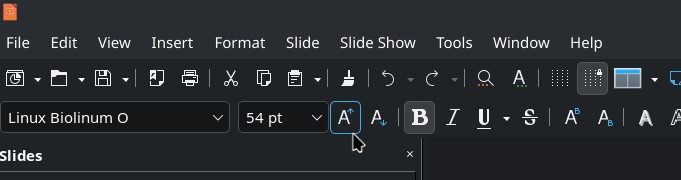
                                @freakboy3742 The font "size-up" button is right there. Smash it! Lots of times!

                                Shown is the "Increase Font Size" button in #LibreOffice. Shortcut is Ctrl + ]
                                #OpenSource

                                Link Preview Image
                                1 Reply Last reply
                                0
                                • david_chisnall@infosec.exchangeD david_chisnall@infosec.exchange

                                  @freakboy3742

                                  It flummoxes me that 30 years into using computers to show slides, tiny fonts in slide is still widespread practice.

                                  25+ years ago, PowerPoint shipped a misfeature where, if you typed more text into a text box, it would automatically shrink the text to fit.

                                  When Keynote shipped, it did not have this misfeature. I believe this is 90% of the reason that early Keynote presentations looked better than PowerPoint presentations of the same era: If you typed too much text into a box in PowerPoint, it would make it unreadable for people in the audience, if you did the same in Keynote you had to manually reduce the size and that felt wrong.

                                  Some time around Keynote 3ish, they also added this misfeature.

                                  laescude@mastodon.crL This user is from outside of this forum
                                  laescude@mastodon.crL This user is from outside of this forum
                                  laescude@mastodon.cr
                                  wrote last edited by
                                  #23

                                  @david_chisnall @freakboy3742 😡 I hate autofit!

                                  1 Reply Last reply
                                  0
                                  • freakboy3742@cloudisland.nzF freakboy3742@cloudisland.nz

                                    RE: https://oldbytes.space/@feoh/116687129039392818

                                    Advice I was given in my youth:

                                    Print your slide on a full piece of paper. Put the paper on the ground. Stand on a chair.

                                    If you can’t easily read your slide, neither can the person at the back of the room.

                                    It flummoxes me that 30 years into using computers to show slides, tiny fonts in slide is *still* widespread practice.

                                    mdione@en.osm.townM This user is from outside of this forum
                                    mdione@en.osm.townM This user is from outside of this forum
                                    mdione@en.osm.town
                                    wrote last edited by
                                    #24

                                    @freakboy3742 and it would be nice if conference organizers would advise the projector's resolutions, because it's not the same to write slides in an 8k screen and then project in a 1080p projector.

                                    freakboy3742@cloudisland.nzF 1 Reply Last reply
                                    0
                                    • freakboy3742@cloudisland.nzF freakboy3742@cloudisland.nz

                                      RE: https://oldbytes.space/@feoh/116687129039392818

                                      Advice I was given in my youth:

                                      Print your slide on a full piece of paper. Put the paper on the ground. Stand on a chair.

                                      If you can’t easily read your slide, neither can the person at the back of the room.

                                      It flummoxes me that 30 years into using computers to show slides, tiny fonts in slide is *still* widespread practice.

                                      em_and_future_cats@mastodon.socialE This user is from outside of this forum
                                      em_and_future_cats@mastodon.socialE This user is from outside of this forum
                                      em_and_future_cats@mastodon.social
                                      wrote last edited by
                                      #25

                                      @freakboy3742
                                      That’s a perfect idea for proofreading! I try to adjust font size so others can see, but depending on the projector and room size it’s hard to judge with a laptop screen. Making sure the font is contrasting well with the background helps ( i .e. background is a picture and font is white, the picture has to be dim so the font stands out) but this makes so much more sense!

                                      1 Reply Last reply
                                      0
                                      • freakboy3742@cloudisland.nzF freakboy3742@cloudisland.nz

                                        RE: https://oldbytes.space/@feoh/116687129039392818

                                        Advice I was given in my youth:

                                        Print your slide on a full piece of paper. Put the paper on the ground. Stand on a chair.

                                        If you can’t easily read your slide, neither can the person at the back of the room.

                                        It flummoxes me that 30 years into using computers to show slides, tiny fonts in slide is *still* widespread practice.

                                        giliell@mastodon.socialG This user is from outside of this forum
                                        giliell@mastodon.socialG This user is from outside of this forum
                                        giliell@mastodon.social
                                        wrote last edited by
                                        #26

                                        @freakboy3742 I'm trying SO FUCKING HARD to teach my students how to do a good presentation.
                                        Your presentation should be readable. Your presentation should add to what you're saying (visuals) and support it (key points). If your presentation is 1:1 what you're saying, then one of you is unnecessary.

                                        chessert@mastodon.onlineC 1 Reply Last reply
                                        0
                                        • renespronk@c.imR renespronk@c.im

                                          @freakboy3742 Personally I blame the prelevalence of online presentations. Small fonts are more acceptable in such a setting because all attendees have a high resolution screen directly in front of them.

                                          Pesenting an in person training, let alone a talk at a conference in a long shoebox shaped room - minimal text, super large fonts.

                                          As a trainer I've worked with companies whose presentation template was created by a design company. Cool, but only aimed at online presentations, so unusable for training.

                                          And no, slide content is neither 'the talk', nor is it reference reading for the attendees. A violin is important in a concerto, but it's not about the violin, but about its effect on those listening, a means to an end.

                                          If you disagree, feel free to use minute fonts and add lots of preferably unrelated clipart, or super complicated ai generated infographics. Wingdings, anyone?

                                          infrapink@mastodon.ieI This user is from outside of this forum
                                          infrapink@mastodon.ieI This user is from outside of this forum
                                          infrapink@mastodon.ie
                                          wrote last edited by
                                          #27

                                          @renespronk @freakboy3742 The problem is older than online presentations. Lots of people just use the slideshow as a bad teleprompter instead of learning how to use it to complement as presentation. Way too many people don't even know how to put their presentation into fullscreen.

                                          Source: I was at uni form 2004 to 2008. Good profs used presentations to complement lectures. Bad profs used it as the lecture.

                                          renespronk@c.imR 1 Reply Last reply
                                          0
                                          Reply
                                          • Reply as topic
                                          Log in to reply
                                          • Oldest to Newest
                                          • Newest to Oldest
                                          • Most Votes


                                          • Login

                                          • Login or register to search.
                                          • First post
                                            Last post
                                          0
                                          • Categories
                                          • Recent
                                          • Tags
                                          • Popular
                                          • World
                                          • Users
                                          • Groups