Skip to content
  • Categories
  • Recent
  • Tags
  • Popular
  • World
  • Users
  • Groups
Skins
  • Light
  • Brite
  • Cerulean
  • Cosmo
  • Flatly
  • Journal
  • Litera
  • Lumen
  • Lux
  • Materia
  • Minty
  • Morph
  • Pulse
  • Sandstone
  • Simplex
  • Sketchy
  • Spacelab
  • United
  • Yeti
  • Zephyr
  • Dark
  • Cyborg
  • Darkly
  • Quartz
  • Slate
  • Solar
  • Superhero
  • Vapor

  • Default (Cyborg)
  • No Skin
Collapse
Brand Logo

CIRCLE WITH A DOT

  1. Home
  2. Uncategorized
  3. I've always known that I'm terrible at using websites (I never know where to click).

I've always known that I'm terrible at using websites (I never know where to click).

Scheduled Pinned Locked Moved Uncategorized
2 Posts 2 Posters 0 Views
  • Oldest to Newest
  • Newest to Oldest
  • Most Votes
Reply
  • Reply as topic
Log in to reply
This topic has been deleted. Only users with topic management privileges can see it.
  • wdormann@infosec.exchangeW This user is from outside of this forum
    wdormann@infosec.exchangeW This user is from outside of this forum
    wdormann@infosec.exchange
    wrote last edited by
    #1

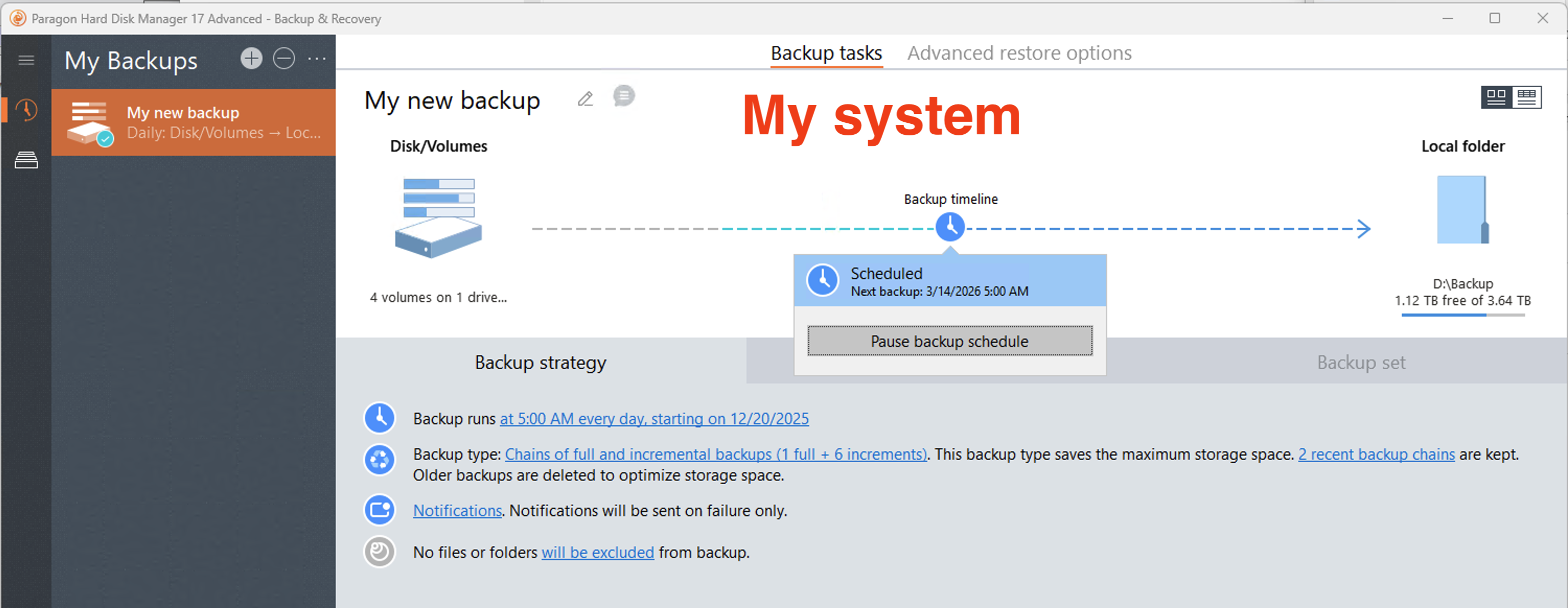
    I've always known that I'm terrible at using websites (I never know where to click). But I guess I've recently realized that this applies to apps as well.

    Today's case: Paragon Hard Disk Manager.

    My goal: Mount a backup as a drive letter.
    After multiple rounds with support, I convinced them to indicate on a screenshot exactly where it is that I should click.

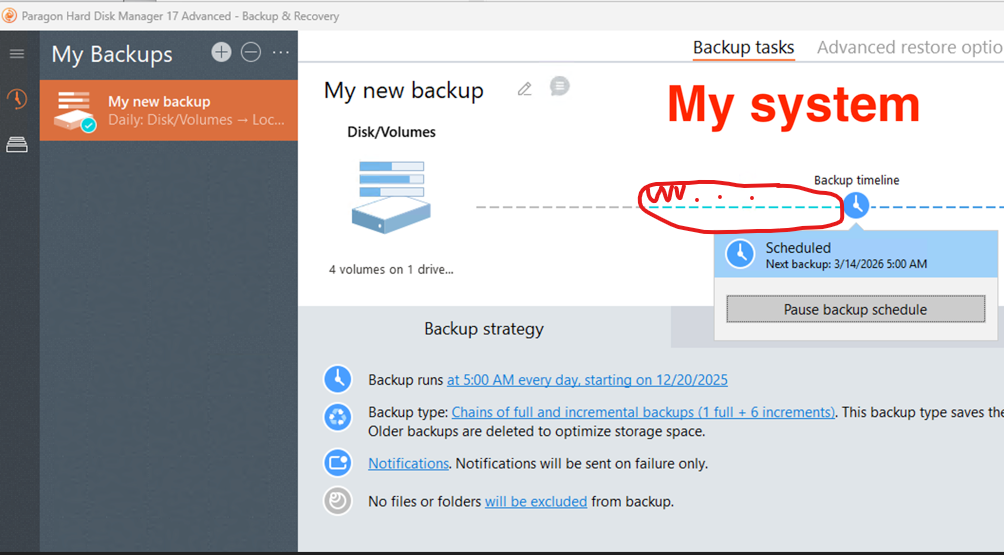
    I get that I'm possibly being obtuse, but I have NEVER in my computing years been drawn to click on a thin DOTTED LINE part of an arrow with the expectation of it doing something.

    And no, there was no mouse hover indication that the line had special meaning.
    Link Preview ImageLink Preview ImageLink Preview Image
    buherator@infosec.placeB 1 Reply Last reply
    1
    0
    • wdormann@infosec.exchangeW wdormann@infosec.exchange

      I've always known that I'm terrible at using websites (I never know where to click). But I guess I've recently realized that this applies to apps as well.

      Today's case: Paragon Hard Disk Manager.

      My goal: Mount a backup as a drive letter.
      After multiple rounds with support, I convinced them to indicate on a screenshot exactly where it is that I should click.

      I get that I'm possibly being obtuse, but I have NEVER in my computing years been drawn to click on a thin DOTTED LINE part of an arrow with the expectation of it doing something.

      And no, there was no mouse hover indication that the line had special meaning.
      Link Preview ImageLink Preview ImageLink Preview Image
      buherator@infosec.placeB This user is from outside of this forum
      buherator@infosec.placeB This user is from outside of this forum
      buherator@infosec.place
      wrote last edited by
      #2
      @wdormann similar experience when using itunes for the first and the last time: importing a disk is nowhere to be found in the menu. The only way to do that is drag&drop. Like, how am I supposed to figure that out?
      1 Reply Last reply
      1
      0
      • R relay@relay.infosec.exchange shared this topic
        R relay@relay.publicsquare.global shared this topic
      Reply
      • Reply as topic
      Log in to reply
      • Oldest to Newest
      • Newest to Oldest
      • Most Votes


      • Login

      • Login or register to search.
      • First post
        Last post
      0
      • Categories
      • Recent
      • Tags
      • Popular
      • World
      • Users
      • Groups