Skip to content
  • Categories
  • Recent
  • Tags
  • Popular
  • World
  • Users
  • Groups
Skins
  • Light
  • Brite
  • Cerulean
  • Cosmo
  • Flatly
  • Journal
  • Litera
  • Lumen
  • Lux
  • Materia
  • Minty
  • Morph
  • Pulse
  • Sandstone
  • Simplex
  • Sketchy
  • Spacelab
  • United
  • Yeti
  • Zephyr
  • Dark
  • Cyborg
  • Darkly
  • Quartz
  • Slate
  • Solar
  • Superhero
  • Vapor

  • Default (Cyborg)
  • No Skin
Collapse
Brand Logo

CIRCLE WITH A DOT

  1. Home
  2. Uncategorized
  3. Latest #firefox #ESR (v149.0) appears to have stopped reporting the HTTP error code when something goes wrong… in this case for a 403.
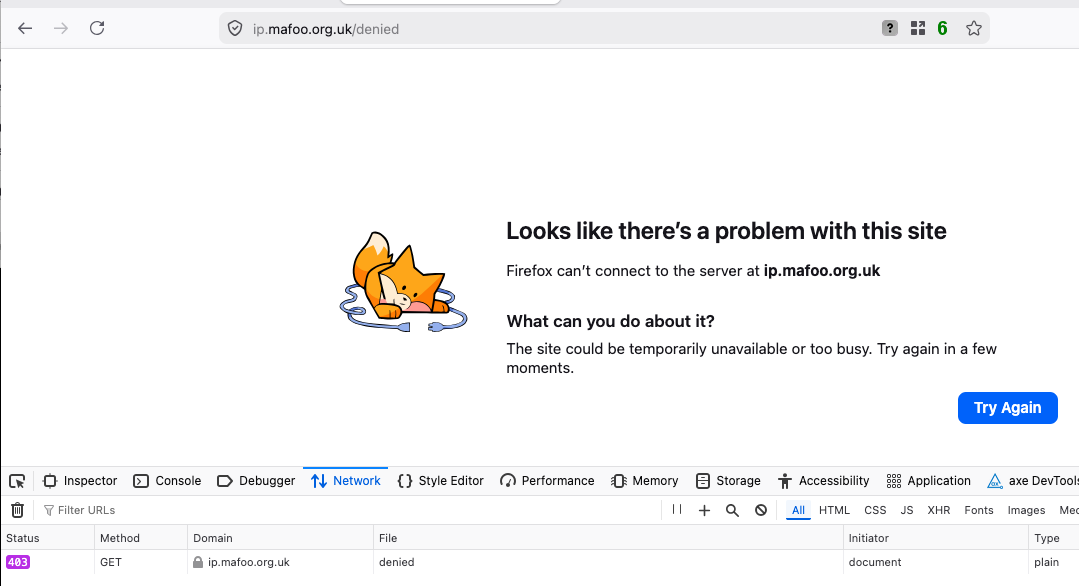
Latest #firefox #ESR (v149.0) appears to have stopped reporting the HTTP error code when something goes wrong… in this case for a 403.

Scheduled Pinned Locked Moved Uncategorized
firefoxesr
12 Posts 8 Posters 0 Views
  • Oldest to Newest
  • Newest to Oldest
  • Most Votes
Reply
  • Reply as topic
Log in to reply
This topic has been deleted. Only users with topic management privileges can see it.
  • fooflington@infosec.exchangeF This user is from outside of this forum
    fooflington@infosec.exchangeF This user is from outside of this forum
    fooflington@infosec.exchange
    wrote last edited by
    #1

    Latest #firefox #ESR (v149.0) appears to have stopped reporting the HTTP error code when something goes wrong… in this case for a 403. It used to include the HTTP code and some useful words.

    In this error, it looks like the connection just didn't work rather than we got an error from the server.

    Is there a way to turn this back on?

    neilmadden@infosec.exchangeN preya@mastodon.socialP tdp_org@mastodon.socialT G lennybacon@infosec.exchangeL 5 Replies Last reply
    2
    0
    • R relay@relay.infosec.exchange shared this topic
    • fooflington@infosec.exchangeF fooflington@infosec.exchange

      Latest #firefox #ESR (v149.0) appears to have stopped reporting the HTTP error code when something goes wrong… in this case for a 403. It used to include the HTTP code and some useful words.

      In this error, it looks like the connection just didn't work rather than we got an error from the server.

      Is there a way to turn this back on?

      neilmadden@infosec.exchangeN This user is from outside of this forum
      neilmadden@infosec.exchangeN This user is from outside of this forum
      neilmadden@infosec.exchange
      wrote last edited by
      #2

      @fooflington “there’s a problem with the site” for a 4xx error is really galling!

      fooflington@infosec.exchangeF 1 Reply Last reply
      0
      • neilmadden@infosec.exchangeN neilmadden@infosec.exchange

        @fooflington “there’s a problem with the site” for a 4xx error is really galling!

        fooflington@infosec.exchangeF This user is from outside of this forum
        fooflington@infosec.exchangeF This user is from outside of this forum
        fooflington@infosec.exchange
        wrote last edited by
        #3

        @neilmadden yes! It took me a moment to realise it wasn't telling me the whole truth…!

        "Something went wrong" would have been better words… but I still want to know what's going on underneath, even if it's on a "Show more..." button.

        1 Reply Last reply
        0
        • fooflington@infosec.exchangeF fooflington@infosec.exchange

          Latest #firefox #ESR (v149.0) appears to have stopped reporting the HTTP error code when something goes wrong… in this case for a 403. It used to include the HTTP code and some useful words.

          In this error, it looks like the connection just didn't work rather than we got an error from the server.

          Is there a way to turn this back on?

          preya@mastodon.socialP This user is from outside of this forum
          preya@mastodon.socialP This user is from outside of this forum
          preya@mastodon.social
          wrote last edited by
          #4

          @fooflington Yeah, I've had this for a while, it's really annoying.

          1 Reply Last reply
          0
          • fooflington@infosec.exchangeF fooflington@infosec.exchange

            Latest #firefox #ESR (v149.0) appears to have stopped reporting the HTTP error code when something goes wrong… in this case for a 403. It used to include the HTTP code and some useful words.

            In this error, it looks like the connection just didn't work rather than we got an error from the server.

            Is there a way to turn this back on?

            tdp_org@mastodon.socialT This user is from outside of this forum
            tdp_org@mastodon.socialT This user is from outside of this forum
            tdp_org@mastodon.social
            wrote last edited by
            #5

            @fooflington I assume Moz are looking to make error pages less confusing/intimidating for less technical users - which is probably reasonable.

            What's not reasonable is that this page gives wholly incorrect advice - "try again in a few moments" is not gonna work for a 403 or indeed any 4XX since they're all client/request errors.

            FWIW/tangentially related, I'd still love an "I'm technical, show me all the details" setting on web browsers/software/OSs.

            interpipes@thx.ggI noratrieb@hachyderm.ioN 2 Replies Last reply
            0
            • R relay@relay.mycrowd.ca shared this topic
            • fooflington@infosec.exchangeF fooflington@infosec.exchange

              Latest #firefox #ESR (v149.0) appears to have stopped reporting the HTTP error code when something goes wrong… in this case for a 403. It used to include the HTTP code and some useful words.

              In this error, it looks like the connection just didn't work rather than we got an error from the server.

              Is there a way to turn this back on?

              G This user is from outside of this forum
              G This user is from outside of this forum
              guenther@chaos.social
              wrote last edited by
              #6

              @fooflington the cherry on top is that the wording of different parts of the UI is contradictory.

              When I visit a page on 127.0.0.1 (via plain http) that returns 404, it says that there's a problem with the website and that Firefox couldn't connect.

              The security shield icon in the URL bar shows a check mark though, and if i click it, it says there's a connection error and if I click that error, it says that I'm connected securely.

              fooflington@infosec.exchangeF 1 Reply Last reply
              0
              • tdp_org@mastodon.socialT tdp_org@mastodon.social

                @fooflington I assume Moz are looking to make error pages less confusing/intimidating for less technical users - which is probably reasonable.

                What's not reasonable is that this page gives wholly incorrect advice - "try again in a few moments" is not gonna work for a 403 or indeed any 4XX since they're all client/request errors.

                FWIW/tangentially related, I'd still love an "I'm technical, show me all the details" setting on web browsers/software/OSs.

                interpipes@thx.ggI This user is from outside of this forum
                interpipes@thx.ggI This user is from outside of this forum
                interpipes@thx.gg
                wrote last edited by
                #7

                @tdp_org @fooflington there is no good reason whatsoever to do this over providing a plain english (or whatever localisation) explanation of the main codes and to still show the error code

                This perpetual dumbing down is not required, at all, we just have to meet users where they are, not expect/treat them as too stupid to understand *anything*

                interpipes@thx.ggI 1 Reply Last reply
                0
                • interpipes@thx.ggI interpipes@thx.gg

                  @tdp_org @fooflington there is no good reason whatsoever to do this over providing a plain english (or whatever localisation) explanation of the main codes and to still show the error code

                  This perpetual dumbing down is not required, at all, we just have to meet users where they are, not expect/treat them as too stupid to understand *anything*

                  interpipes@thx.ggI This user is from outside of this forum
                  interpipes@thx.ggI This user is from outside of this forum
                  interpipes@thx.gg
                  wrote last edited by
                  #8

                  @tdp_org @fooflington “oopsie poopsie something went wrong try again maybe?” as an error message paradigm needs to die in a fire and every product manager - surely no actual developer is suggesting this - who thinks it appropriate needs to find a new career running a children’s soft play centre

                  interpipes@thx.ggI 1 Reply Last reply
                  0
                  • interpipes@thx.ggI interpipes@thx.gg

                    @tdp_org @fooflington “oopsie poopsie something went wrong try again maybe?” as an error message paradigm needs to die in a fire and every product manager - surely no actual developer is suggesting this - who thinks it appropriate needs to find a new career running a children’s soft play centre

                    interpipes@thx.ggI This user is from outside of this forum
                    interpipes@thx.ggI This user is from outside of this forum
                    interpipes@thx.gg
                    wrote last edited by
                    #9

                    @tdp_org @fooflington I cannot even begin to fathom the shortsightedness on display here

                    can ai slop generators not code switch statements or something, or did it keep inventing error codes that didn’t exist?

                    1 Reply Last reply
                    0
                    • G guenther@chaos.social

                      @fooflington the cherry on top is that the wording of different parts of the UI is contradictory.

                      When I visit a page on 127.0.0.1 (via plain http) that returns 404, it says that there's a problem with the website and that Firefox couldn't connect.

                      The security shield icon in the URL bar shows a check mark though, and if i click it, it says there's a connection error and if I click that error, it says that I'm connected securely.

                      fooflington@infosec.exchangeF This user is from outside of this forum
                      fooflington@infosec.exchangeF This user is from outside of this forum
                      fooflington@infosec.exchange
                      wrote last edited by
                      #10

                      @guenther oh, joy!

                      1 Reply Last reply
                      0
                      • fooflington@infosec.exchangeF fooflington@infosec.exchange

                        Latest #firefox #ESR (v149.0) appears to have stopped reporting the HTTP error code when something goes wrong… in this case for a 403. It used to include the HTTP code and some useful words.

                        In this error, it looks like the connection just didn't work rather than we got an error from the server.

                        Is there a way to turn this back on?

                        lennybacon@infosec.exchangeL This user is from outside of this forum
                        lennybacon@infosec.exchangeL This user is from outside of this forum
                        lennybacon@infosec.exchange
                        wrote last edited by
                        #11

                        @fooflington
                        @firefoxwebdevs can probably help. Hopefully.

                        1 Reply Last reply
                        1
                        0
                        • tdp_org@mastodon.socialT tdp_org@mastodon.social

                          @fooflington I assume Moz are looking to make error pages less confusing/intimidating for less technical users - which is probably reasonable.

                          What's not reasonable is that this page gives wholly incorrect advice - "try again in a few moments" is not gonna work for a 403 or indeed any 4XX since they're all client/request errors.

                          FWIW/tangentially related, I'd still love an "I'm technical, show me all the details" setting on web browsers/software/OSs.

                          noratrieb@hachyderm.ioN This user is from outside of this forum
                          noratrieb@hachyderm.ioN This user is from outside of this forum
                          noratrieb@hachyderm.io
                          wrote last edited by
                          #12

                          @tdp_org @fooflington This advice doesn't seem unreasonable. It's like that a normal user encountering a 403 is a website configuration issue where it has a broken link or they messed up authorization on an endpoint, both of which may be fixed in the future

                          1 Reply Last reply
                          0
                          Reply
                          • Reply as topic
                          Log in to reply
                          • Oldest to Newest
                          • Newest to Oldest
                          • Most Votes


                          • Login

                          • Login or register to search.
                          • First post
                            Last post
                          0
                          • Categories
                          • Recent
                          • Tags
                          • Popular
                          • World
                          • Users
                          • Groups