Skip to content
  • Categories
  • Recent
  • Tags
  • Popular
  • World
  • Users
  • Groups
Skins
  • Light
  • Brite
  • Cerulean
  • Cosmo
  • Flatly
  • Journal
  • Litera
  • Lumen
  • Lux
  • Materia
  • Minty
  • Morph
  • Pulse
  • Sandstone
  • Simplex
  • Sketchy
  • Spacelab
  • United
  • Yeti
  • Zephyr
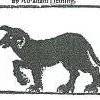
  • Dark
  • Cyborg
  • Darkly
  • Quartz
  • Slate
  • Solar
  • Superhero
  • Vapor

  • Default (Cyborg)
  • No Skin
Collapse
Brand Logo

CIRCLE WITH A DOT

  1. Home
  2. Uncategorized
  3. If you disable pasting in your password field, I hate you.

If you disable pasting in your password field, I hate you.

Scheduled Pinned Locked Moved Uncategorized
52 Posts 38 Posters 0 Views
  • Oldest to Newest
  • Newest to Oldest
  • Most Votes
Reply
  • Reply as topic
Log in to reply
This topic has been deleted. Only users with topic management privileges can see it.
  • brainblasted@crab.gardenB brainblasted@crab.garden

    If you disable pasting in your password field, I hate you. I hate you even more if you don't have a "show password" button so I can verify that I'm typing my password correctly since you won't let me paste

    wideeyedcurious@mstdn.socialW This user is from outside of this forum
    wideeyedcurious@mstdn.socialW This user is from outside of this forum
    wideeyedcurious@mstdn.social
    wrote last edited by
    #10

    @brainblasted I second that.

    1 Reply Last reply
    0
    • brainblasted@crab.gardenB brainblasted@crab.garden

      If you disable pasting in your password field, I hate you. I hate you even more if you don't have a "show password" button so I can verify that I'm typing my password correctly since you won't let me paste

      theduesentrieb@social.linux.pizzaT This user is from outside of this forum
      theduesentrieb@social.linux.pizzaT This user is from outside of this forum
      theduesentrieb@social.linux.pizza
      wrote last edited by
      #11

      @brainblasted there's a special place in hell, right after people that don't let you type out a date but force a date picker at you

      lauxmyth@mastodon.onlineL anctreat5358@mindly.socialA mattdm@hachyderm.ioM 3 Replies Last reply
      0
      • brainblasted@crab.gardenB brainblasted@crab.garden

        If you disable pasting in your password field, I hate you. I hate you even more if you don't have a "show password" button so I can verify that I'm typing my password correctly since you won't let me paste

        magnetic_tape@infosec.exchangeM This user is from outside of this forum
        magnetic_tape@infosec.exchangeM This user is from outside of this forum
        magnetic_tape@infosec.exchange
        wrote last edited by
        #12

        @brainblasted
        The underlaying issue here is that modern OSes generate a paste event instead of simulating a typing keycodes event which would prevent any shennigans like this to work in the first place

        1 Reply Last reply
        0
        • brainblasted@crab.gardenB brainblasted@crab.garden

          If you disable pasting in your password field, I hate you. I hate you even more if you don't have a "show password" button so I can verify that I'm typing my password correctly since you won't let me paste

          kdude@mastodon.socialK This user is from outside of this forum
          kdude@mastodon.socialK This user is from outside of this forum
          kdude@mastodon.social
          wrote last edited by
          #13

          @brainblasted so annoying... on desktops i have a system-wide keyboard shortcut which triggers "type the clipboard contents", as a workaround.

          cppguy@infosec.spaceC 1 Reply Last reply
          0
          • kdude@mastodon.socialK kdude@mastodon.social

            @brainblasted so annoying... on desktops i have a system-wide keyboard shortcut which triggers "type the clipboard contents", as a workaround.

            cppguy@infosec.spaceC This user is from outside of this forum
            cppguy@infosec.spaceC This user is from outside of this forum
            cppguy@infosec.space
            wrote last edited by
            #14

            @Kdude

            Interesting! Which OS are you using, and how did you set up the shortcut?

            @brainblasted

            kdude@mastodon.socialK 1 Reply Last reply
            0
            • brainblasted@crab.gardenB brainblasted@crab.garden

              If you disable pasting in your password field, I hate you. I hate you even more if you don't have a "show password" button so I can verify that I'm typing my password correctly since you won't let me paste

              fenixmaster@mastodon.socialF This user is from outside of this forum
              fenixmaster@mastodon.socialF This user is from outside of this forum
              fenixmaster@mastodon.social
              wrote last edited by
              #15

              @brainblasted I use a simple paper boolet with A, B, C, .... and pretty complex passwords with subtitution parts, some more than 20 character long. The substitution parts are not known in the booklet, only in my mind. I never trust password managers.

              1 Reply Last reply
              0
              • brainblasted@crab.gardenB brainblasted@crab.garden

                If you disable pasting in your password field, I hate you. I hate you even more if you don't have a "show password" button so I can verify that I'm typing my password correctly since you won't let me paste

                pascaline@mastodon.nlP This user is from outside of this forum
                pascaline@mastodon.nlP This user is from outside of this forum
                pascaline@mastodon.nl
                wrote last edited by
                #16

                @brainblasted

                Oh yes, that's so bad.
                I have an app here on the phone that does not allow pasting. I've been silently ranting and raging about it. Internalisation is a thing.

                1 Reply Last reply
                0
                • cppguy@infosec.spaceC cppguy@infosec.space

                  @Kdude

                  Interesting! Which OS are you using, and how did you set up the shortcut?

                  @brainblasted

                  kdude@mastodon.socialK This user is from outside of this forum
                  kdude@mastodon.socialK This user is from outside of this forum
                  kdude@mastodon.social
                  wrote last edited by
                  #17

                  @CppGuy @brainblasted Linux: Espanso
                  Previously, macOS: Keyboard Maestro

                  Link Preview Image
                  Getting Started | Espanso

                  In this section, we will cover the basics of Espanso to quickly get you started.

                  favicon

                  (espanso.org)

                  1 Reply Last reply
                  0
                  • brainblasted@crab.gardenB brainblasted@crab.garden

                    If you disable pasting in your password field, I hate you. I hate you even more if you don't have a "show password" button so I can verify that I'm typing my password correctly since you won't let me paste

                    the5thcolumnist@mstdn.caT This user is from outside of this forum
                    the5thcolumnist@mstdn.caT This user is from outside of this forum
                    the5thcolumnist@mstdn.ca
                    wrote last edited by
                    #18

                    @brainblasted

                    Password show buttons should be de-rigour and obvious. Everyone is not entering passwords with someone looking over their shoulder, I would suggest most people are not,

                    1 Reply Last reply
                    0
                    • brainblasted@crab.gardenB brainblasted@crab.garden

                      If you disable pasting in your password field, I hate you. I hate you even more if you don't have a "show password" button so I can verify that I'm typing my password correctly since you won't let me paste

                      cbrocas@infosec.exchangeC This user is from outside of this forum
                      cbrocas@infosec.exchangeC This user is from outside of this forum
                      cbrocas@infosec.exchange
                      wrote last edited by
                      #19

                      @brainblasted I lived that particular moment so many times 💯

                      1 Reply Last reply
                      0
                      • brainblasted@crab.gardenB brainblasted@crab.garden

                        If you disable pasting in your password field, I hate you. I hate you even more if you don't have a "show password" button so I can verify that I'm typing my password correctly since you won't let me paste

                        haayman@todon.nlH This user is from outside of this forum
                        haayman@todon.nlH This user is from outside of this forum
                        haayman@todon.nl
                        wrote last edited by
                        #20

                        @brainblasted Do you know what a bookmarklet is? It's a tiny javascript that you can add to your bookmarks at the top of the page. Instead of having an URL in the target, you add this script.
                        If you click on the link, it will find all password fields on the page and turn it into a regular input field to make the content visible. It is harmless and has no impact on the workings of the page

                        ```
                        javascript:(function(){
                        document.querySelectorAll('input[type="password"]').forEach(el => el.type = 'text');})()
                        ```

                        brainblasted@crab.gardenB thaodan@mastodon.socialT 2 Replies Last reply
                        0
                        • haayman@todon.nlH haayman@todon.nl

                          @brainblasted Do you know what a bookmarklet is? It's a tiny javascript that you can add to your bookmarks at the top of the page. Instead of having an URL in the target, you add this script.
                          If you click on the link, it will find all password fields on the page and turn it into a regular input field to make the content visible. It is harmless and has no impact on the workings of the page

                          ```
                          javascript:(function(){
                          document.querySelectorAll('input[type="password"]').forEach(el => el.type = 'text');})()
                          ```

                          brainblasted@crab.gardenB This user is from outside of this forum
                          brainblasted@crab.gardenB This user is from outside of this forum
                          brainblasted@crab.garden
                          wrote last edited by
                          #21

                          @haayman til! Thanks for the tip

                          1 Reply Last reply
                          0
                          • brainblasted@crab.gardenB brainblasted@crab.garden

                            If you disable pasting in your password field, I hate you. I hate you even more if you don't have a "show password" button so I can verify that I'm typing my password correctly since you won't let me paste

                            cwant@mathstodon.xyzC This user is from outside of this forum
                            cwant@mathstodon.xyzC This user is from outside of this forum
                            cwant@mathstodon.xyz
                            wrote last edited by
                            #22

                            @brainblasted this is all true, but my least favorite is "I'm only gonna give you three tries then lock you out". (Nobody can brute force a password in three tries, so what problem is that solving?)

                            1 Reply Last reply
                            0
                            • brainblasted@crab.gardenB brainblasted@crab.garden

                              If you disable pasting in your password field, I hate you. I hate you even more if you don't have a "show password" button so I can verify that I'm typing my password correctly since you won't let me paste

                              larvitz@burningboard.netL This user is from outside of this forum
                              larvitz@burningboard.netL This user is from outside of this forum
                              larvitz@burningboard.net
                              wrote last edited by larvitz@burningboard.net
                              #23

                              @brainblasted My previous bank has not only disabled "paste" in their iOS banking app login - they even implemented their *OWN ON-SCREEN KEYBOARD* for passwort entry.. (and that one was hardcoded to German qwertz layout ..)

                              fentiger@mastodon.socialF anctreat5358@mindly.socialA 2 Replies Last reply
                              0
                              • larvitz@burningboard.netL larvitz@burningboard.net

                                @brainblasted My previous bank has not only disabled "paste" in their iOS banking app login - they even implemented their *OWN ON-SCREEN KEYBOARD* for passwort entry.. (and that one was hardcoded to German qwertz layout ..)

                                fentiger@mastodon.socialF This user is from outside of this forum
                                fentiger@mastodon.socialF This user is from outside of this forum
                                fentiger@mastodon.social
                                wrote last edited by
                                #24

                                @Larvitz @brainblasted For ultimate security, they should invent some special characters that are only found on their custom keyboard, and then require you to use them in your password. 😉

                                1 Reply Last reply
                                0
                                • brainblasted@crab.gardenB brainblasted@crab.garden

                                  If you disable pasting in your password field, I hate you. I hate you even more if you don't have a "show password" button so I can verify that I'm typing my password correctly since you won't let me paste

                                  leeloo@chaosfem.twL This user is from outside of this forum
                                  leeloo@chaosfem.twL This user is from outside of this forum
                                  leeloo@chaosfem.tw
                                  wrote last edited by
                                  #25

                                  @brainblasted
                                  My password manager has an autotype function, rather than pasting the password, it sends the username and password as keystrokes.

                                  tarbh@mastodon.ieT 1 Reply Last reply
                                  0
                                  • leeloo@chaosfem.twL leeloo@chaosfem.tw

                                    @brainblasted
                                    My password manager has an autotype function, rather than pasting the password, it sends the username and password as keystrokes.

                                    tarbh@mastodon.ieT This user is from outside of this forum
                                    tarbh@mastodon.ieT This user is from outside of this forum
                                    tarbh@mastodon.ie
                                    wrote last edited by
                                    #26

                                    @leeloo @brainblasted What password manager is that?

                                    leeloo@chaosfem.twL 1 Reply Last reply
                                    0
                                    • tarbh@mastodon.ieT tarbh@mastodon.ie

                                      @leeloo @brainblasted What password manager is that?

                                      leeloo@chaosfem.twL This user is from outside of this forum
                                      leeloo@chaosfem.twL This user is from outside of this forum
                                      leeloo@chaosfem.tw
                                      wrote last edited by
                                      #27

                                      @Tarbh @brainblasted
                                      https://www.pwsafe.org/

                                      1 Reply Last reply
                                      0
                                      • ben@mastodon.lubar.meB ben@mastodon.lubar.me

                                        @CheapPontoon @brainblasted if you can find the password input field in the developer console, you can manipulate it directly

                                        1. Ctrl+Shift+i to open the developer console in most browsers. If the website tries to stop you, you can do it in the address bar so it doesn't have a chance to intercept.
                                        2. Go to the first tab (the one that has a bunch of lines of text starting with <) and find the password input. There's a button in every browser's developer tools to pick an element using your mouse, which can help on pages with complicated markup.
                                        3. If there's not a text box at the bottom of the developer tools, hit the ESC key once to bring it up.
                                        4. With the <input type="password" element still selected, type $0.value in the text box and press enter to see what password is in the box.
                                        5. You can also type $0.value = prompt() to get a text box controlled by your browser that you can paste the password into
                                        haayman@todon.nlH This user is from outside of this forum
                                        haayman@todon.nlH This user is from outside of this forum
                                        haayman@todon.nl
                                        wrote last edited by
                                        #28

                                        @ben @CheapPontoon @brainblasted I may have an easier solution:
                                        https://todon.nl/@haayman/116070020654615607

                                        cheappontoon@beige.partyC 1 Reply Last reply
                                        0
                                        • brainblasted@crab.gardenB brainblasted@crab.garden

                                          If you disable pasting in your password field, I hate you. I hate you even more if you don't have a "show password" button so I can verify that I'm typing my password correctly since you won't let me paste

                                          plwt@mstdn.socialP This user is from outside of this forum
                                          plwt@mstdn.socialP This user is from outside of this forum
                                          plwt@mstdn.social
                                          wrote last edited by
                                          #29

                                          @brainblasted Hi Chris. If you use Firefox, one of these add-ons might help:

                                          Link Preview Image
                                          Paste Enabler – Get this Extension for 🦊 Firefox (en-US)

                                          Download Paste Enabler for Firefox. Addon that allows to paste into a web page, even if it is blocked. When you are on a web page that prohibits it, click on the extension icon. It will force the possibility of pasting.

                                          favicon

                                          (addons.mozilla.org)
                                          Link Preview Image
                                          Force Paster – Get this Extension for 🦊 Firefox (en-US)

                                          Download Force Paster for Firefox. This extension pastes your text even where pasting is disabled.

                                          favicon

                                          (addons.mozilla.org)

                                          Link Preview Image
                                          Don't Fuck With Paste – Get this Extension for 🦊 Firefox (en-US)

                                          Download Don't Fuck With Paste for Firefox. This add-on stops websites from blocking copy and paste for password fields and other input fields.

                                          favicon

                                          (addons.mozilla.org)

                                          #fxhelp

                                          mc_chouffe@mamot.frM 1 Reply Last reply
                                          0
                                          Reply
                                          • Reply as topic
                                          Log in to reply
                                          • Oldest to Newest
                                          • Newest to Oldest
                                          • Most Votes


                                          • Login

                                          • Login or register to search.
                                          • First post
                                            Last post
                                          0
                                          • Categories
                                          • Recent
                                          • Tags
                                          • Popular
                                          • World
                                          • Users
                                          • Groups