Skip to content
  • Categories
  • Recent
  • Tags
  • Popular
  • World
  • Users
  • Groups
Skins
  • Light
  • Brite
  • Cerulean
  • Cosmo
  • Flatly
  • Journal
  • Litera
  • Lumen
  • Lux
  • Materia
  • Minty
  • Morph
  • Pulse
  • Sandstone
  • Simplex
  • Sketchy
  • Spacelab
  • United
  • Yeti
  • Zephyr
  • Dark
  • Cyborg
  • Darkly
  • Quartz
  • Slate
  • Solar
  • Superhero
  • Vapor

  • Default (Cyborg)
  • No Skin
Collapse
Brand Logo

CIRCLE WITH A DOT

  1. Home
  2. Uncategorized
  3. Run the following to see your PATH settings in easy to read format on screen:```tr ":" "\n" <<<"$PATH" tr ":" "\n" <<<"$PATH" | lolocat```This is a little more portable```echo "$PATH" | tr ":" "\n" echo "$PATH" | tr ":" "\n" | lolcat```

Run the following to see your PATH settings in easy to read format on screen:```tr ":" "\n" <<<"$PATH" tr ":" "\n" <<<"$PATH" | lolocat```This is a little more portable```echo "$PATH" | tr ":" "\n" echo "$PATH" | tr ":" "\n" | lolcat```

Scheduled Pinned Locked Moved Uncategorized
unixlinux
5 Posts 4 Posters 0 Views
  • Oldest to Newest
  • Newest to Oldest
  • Most Votes
Reply
  • Reply as topic
Log in to reply
This topic has been deleted. Only users with topic management privileges can see it.
  • nixcraft@mastodon.socialN This user is from outside of this forum
    nixcraft@mastodon.socialN This user is from outside of this forum
    nixcraft@mastodon.social
    wrote last edited by
    #1

    Run the following to see your PATH settings in easy to read format on screen:
    ```
    tr ":" "\n" <<<"$PATH"
    tr ":" "\n" <<<"$PATH" | lolocat
    ```
    This is a little more portable
    ```
    echo "$PATH" | tr ":" "\n"
    echo "$PATH" | tr ":" "\n" | lolcat
    ```
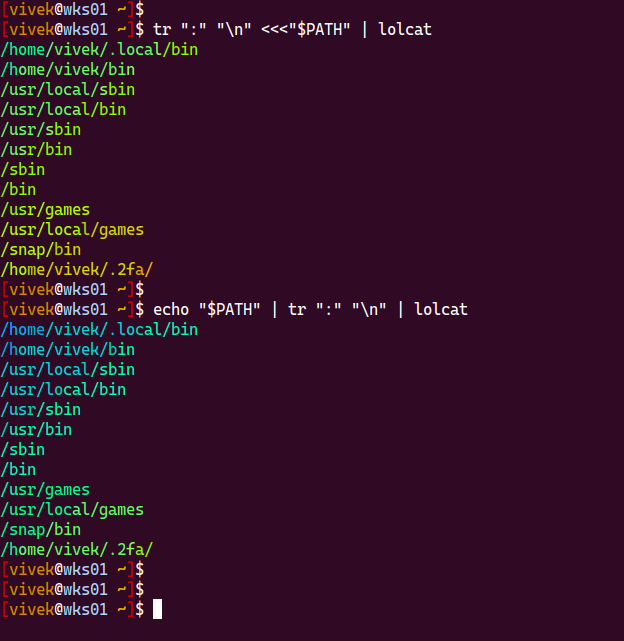
    #unix #linux

    Link Preview Image
    viss@mastodon.socialV gabegie@h4.ioG akkana@fosstodon.orgA 3 Replies Last reply
    1
    0
    • nixcraft@mastodon.socialN nixcraft@mastodon.social

      Run the following to see your PATH settings in easy to read format on screen:
      ```
      tr ":" "\n" <<<"$PATH"
      tr ":" "\n" <<<"$PATH" | lolocat
      ```
      This is a little more portable
      ```
      echo "$PATH" | tr ":" "\n"
      echo "$PATH" | tr ":" "\n" | lolcat
      ```

      #unix #linux

      Link Preview Image
      viss@mastodon.socialV This user is from outside of this forum
      viss@mastodon.socialV This user is from outside of this forum
      viss@mastodon.social
      wrote last edited by
      #2

      @nixCraft pipe together toilet and lolcat

      1 Reply Last reply
      0
      • nixcraft@mastodon.socialN nixcraft@mastodon.social

        Run the following to see your PATH settings in easy to read format on screen:
        ```
        tr ":" "\n" <<<"$PATH"
        tr ":" "\n" <<<"$PATH" | lolocat
        ```
        This is a little more portable
        ```
        echo "$PATH" | tr ":" "\n"
        echo "$PATH" | tr ":" "\n" | lolcat
        ```

        #unix #linux

        Link Preview Image
        gabegie@h4.ioG This user is from outside of this forum
        gabegie@h4.ioG This user is from outside of this forum
        gabegie@h4.io
        wrote last edited by
        #3

        @nixCraft

        Link Preview Image
        1 Reply Last reply
        0
        • nixcraft@mastodon.socialN nixcraft@mastodon.social

          Run the following to see your PATH settings in easy to read format on screen:
          ```
          tr ":" "\n" <<<"$PATH"
          tr ":" "\n" <<<"$PATH" | lolocat
          ```
          This is a little more portable
          ```
          echo "$PATH" | tr ":" "\n"
          echo "$PATH" | tr ":" "\n" | lolcat
          ```

          #unix #linux

          Link Preview Image
          akkana@fosstodon.orgA This user is from outside of this forum
          akkana@fosstodon.orgA This user is from outside of this forum
          akkana@fosstodon.org
          wrote last edited by
          #4

          @nixCraft Nice tr command, thanks!

          But you might want to remove the extra 'o' from 'lolocat'. (Debian, at least, doesn't have a lolocat; I haven't tried installing lolcat because I don't know what it does and it has a bunch of ruby dependencies.)

          nixcraft@mastodon.socialN 1 Reply Last reply
          0
          • akkana@fosstodon.orgA akkana@fosstodon.org

            @nixCraft Nice tr command, thanks!

            But you might want to remove the extra 'o' from 'lolocat'. (Debian, at least, doesn't have a lolocat; I haven't tried installing lolcat because I don't know what it does and it has a bunch of ruby dependencies.)

            nixcraft@mastodon.socialN This user is from outside of this forum
            nixcraft@mastodon.socialN This user is from outside of this forum
            nixcraft@mastodon.social
            wrote last edited by
            #5

            @akkana fixed it. it was a typo on my part.

            1 Reply Last reply
            0
            • R relay@relay.infosec.exchange shared this topic

            Reply
            • Reply as topic
            Log in to reply
            • Oldest to Newest
            • Newest to Oldest
            • Most Votes


            • Login

            • Login or register to search.
            • First post
              Last post
            0
            • Categories
            • Recent
            • Tags
            • Popular
            • World
            • Users
            • Groups