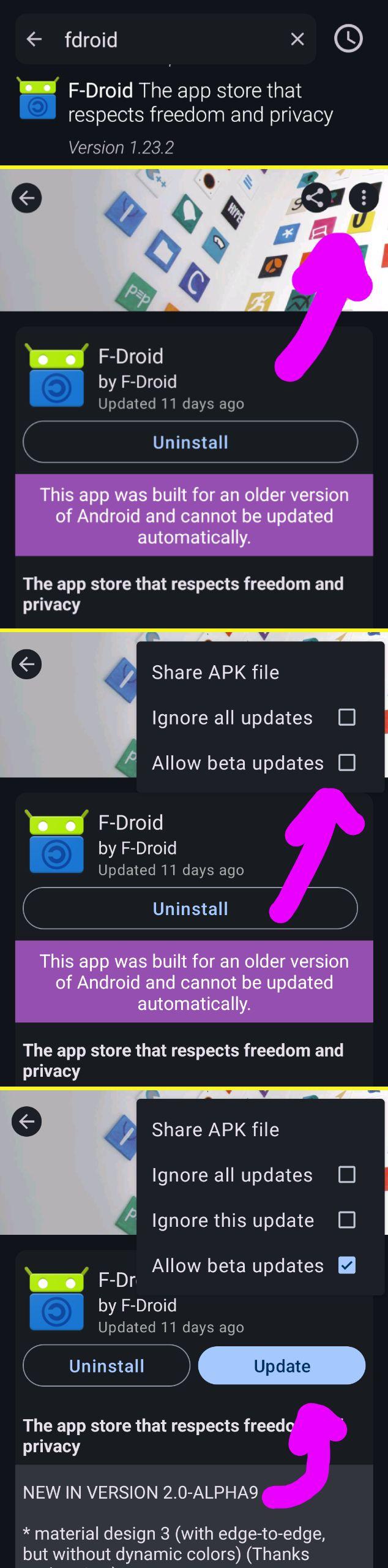
@the_turtle@mastodon.sdf.org In client, open the F-Droid app page, then in the upper right menu, check "betas".
-
@the_turtle@mastodon.sdf.org In client, open the F-Droid app page, then in the upper right menu, check "betas".
-
@the_turtle@mastodon.sdf.org In client, open the F-Droid app page, then in the upper right menu, check "betas".
@fdroidorg this is just a regular post that didn't tag the person you're corresponding with
-
@the_turtle@mastodon.sdf.org In client, open the F-Droid app page, then in the upper right menu, check "betas".
-
@the_turtle@mastodon.sdf.org In client, open the F-Droid app page, then in the upper right menu, check "betas".
@fdroidorg there is no Menu in the upper right.....
-
@the_turtle@mastodon.sdf.org In client, open the F-Droid app page, then in the upper right menu, check "betas".
Fediverse has server blocks, user blocks and stuff, that's the best that I could do.
Anyway, the picture on how to enable beta updates in 1.23.2 or later:
-
R relay@relay.infosec.exchange shared this topic