Skip to content
  • Categories
  • Recent
  • Tags
  • Popular
  • World
  • Users
  • Groups
Skins
  • Light
  • Brite
  • Cerulean
  • Cosmo
  • Flatly
  • Journal
  • Litera
  • Lumen
  • Lux
  • Materia
  • Minty
  • Morph
  • Pulse
  • Sandstone
  • Simplex
  • Sketchy
  • Spacelab
  • United
  • Yeti
  • Zephyr
  • Dark
  • Cyborg
  • Darkly
  • Quartz
  • Slate
  • Solar
  • Superhero
  • Vapor

  • Default (Cyborg)
  • No Skin
Collapse
Brand Logo

CIRCLE WITH A DOT

  1. Home
  2. Uncategorized
  3. PSA

PSA

Scheduled Pinned Locked Moved Uncategorized
firefoxpsa
12 Posts 11 Posters 55 Views
  • Oldest to Newest
  • Newest to Oldest
  • Most Votes
Reply
  • Reply as topic
Log in to reply
This topic has been deleted. Only users with topic management privileges can see it.
  • tsyum@thepit.socialT tsyum@thepit.social

    PSA

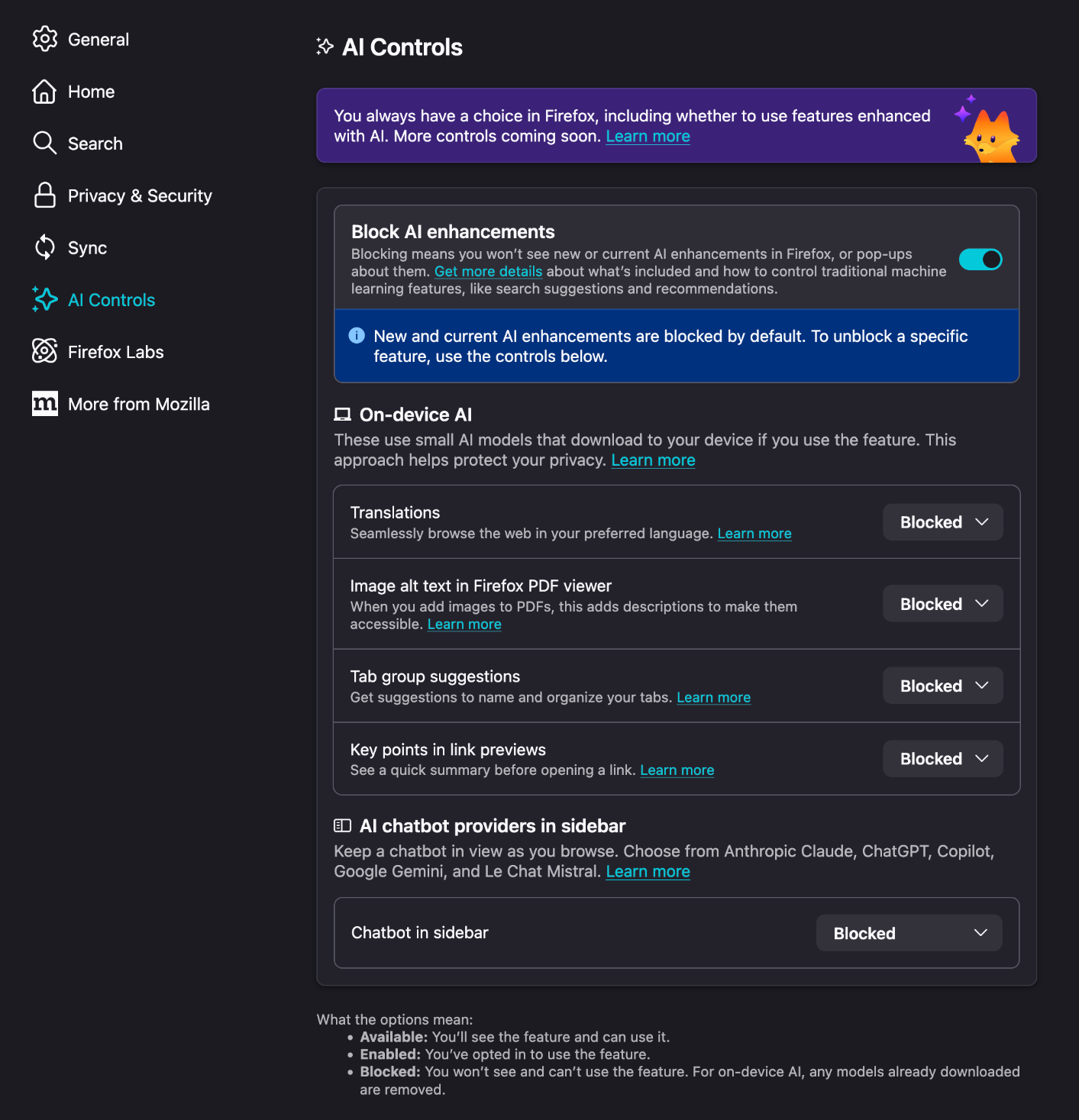
    If you're still using 🔥fox and you update around now, they've added "AI" features that are on by default. Disabling takes two seconds:

    - hamburger button at top right
    - Settings
    - AI controls
    - Block AI enhancements

    #Firefox #PSA

    xenophora@mastodon.artX This user is from outside of this forum
    xenophora@mastodon.artX This user is from outside of this forum
    xenophora@mastodon.art
    wrote last edited by
    #2

    @tsyum

    I take it this is for phones only? I go to the version on my laptop and there are no burgers..

    tsyum@thepit.socialT 1 Reply Last reply
    0
    • xenophora@mastodon.artX xenophora@mastodon.art

      @tsyum

      I take it this is for phones only? I go to the version on my laptop and there are no burgers..

      tsyum@thepit.socialT This user is from outside of this forum
      tsyum@thepit.socialT This user is from outside of this forum
      tsyum@thepit.social
      wrote last edited by
      #3

      @xenophora ah it could be a Linux versus Windows thing (I forgot their browsers can be a little different) but wherever your settings are

      daveosaurus@mastodon.nzD 1 Reply Last reply
      0
      • tsyum@thepit.socialT tsyum@thepit.social

        PSA

        If you're still using 🔥fox and you update around now, they've added "AI" features that are on by default. Disabling takes two seconds:

        - hamburger button at top right
        - Settings
        - AI controls
        - Block AI enhancements

        #Firefox #PSA

        gopal@fedia.socialG This user is from outside of this forum
        gopal@fedia.socialG This user is from outside of this forum
        gopal@fedia.social
        wrote last edited by
        #4

        @tsyum
        I had been using
        #zenbrowser for a while now, which is a fork of firrfox, with all AI features disabled.

        1 Reply Last reply
        0
        • tsyum@thepit.socialT tsyum@thepit.social

          PSA

          If you're still using 🔥fox and you update around now, they've added "AI" features that are on by default. Disabling takes two seconds:

          - hamburger button at top right
          - Settings
          - AI controls
          - Block AI enhancements

          #Firefox #PSA

          ewen@social.ewenbell.comE This user is from outside of this forum
          ewen@social.ewenbell.comE This user is from outside of this forum
          ewen@social.ewenbell.com
          wrote last edited by
          #5

          Please to see my previous preferences to block AI features have not been over ridden by any of the recent updates. My choice to block has remained in place.
          Link Preview Image
          1 Reply Last reply
          0
          • tsyum@thepit.socialT tsyum@thepit.social

            PSA

            If you're still using 🔥fox and you update around now, they've added "AI" features that are on by default. Disabling takes two seconds:

            - hamburger button at top right
            - Settings
            - AI controls
            - Block AI enhancements

            #Firefox #PSA

            bwacton@mastodon.socialB This user is from outside of this forum
            bwacton@mastodon.socialB This user is from outside of this forum
            bwacton@mastodon.social
            wrote last edited by
            #6

            @tsyum thank you, just went back to make sure I had already done this.

            1 Reply Last reply
            0
            • tsyum@thepit.socialT tsyum@thepit.social

              PSA

              If you're still using 🔥fox and you update around now, they've added "AI" features that are on by default. Disabling takes two seconds:

              - hamburger button at top right
              - Settings
              - AI controls
              - Block AI enhancements

              #Firefox #PSA

              qwazix@bananachips.clubQ This user is from outside of this forum
              qwazix@bananachips.clubQ This user is from outside of this forum
              qwazix@bananachips.club
              wrote last edited by
              #7

              @tsyum there is also "page summaries" as well which is not blocked by AI controls (at least on android) and has it's own setting.

              Also translations (which has been there for quite some time) has been retroactively dubbed as AI and will be disabled if you block all AI enhancements

              1 Reply Last reply
              0
              • tsyum@thepit.socialT tsyum@thepit.social

                @xenophora ah it could be a Linux versus Windows thing (I forgot their browsers can be a little different) but wherever your settings are

                daveosaurus@mastodon.nzD This user is from outside of this forum
                daveosaurus@mastodon.nzD This user is from outside of this forum
                daveosaurus@mastodon.nz
                wrote last edited by
                #8

                @tsyum @xenophora I'm running Firefox on Windows 11 and used your instructions to shut down the slop factory.

                1 Reply Last reply
                0
                • tsyum@thepit.socialT tsyum@thepit.social

                  PSA

                  If you're still using 🔥fox and you update around now, they've added "AI" features that are on by default. Disabling takes two seconds:

                  - hamburger button at top right
                  - Settings
                  - AI controls
                  - Block AI enhancements

                  #Firefox #PSA

                  shanaqui@wandering.shopS This user is from outside of this forum
                  shanaqui@wandering.shopS This user is from outside of this forum
                  shanaqui@wandering.shop
                  wrote last edited by
                  #9

                  @tsyum The setting has been there for a couple months and if you previously selected it, that has not been overridden, so people who already enabled that are fine, in case anyone was wondering.

                  1 Reply Last reply
                  0
                  • tsyum@thepit.socialT tsyum@thepit.social

                    PSA

                    If you're still using 🔥fox and you update around now, they've added "AI" features that are on by default. Disabling takes two seconds:

                    - hamburger button at top right
                    - Settings
                    - AI controls
                    - Block AI enhancements

                    #Firefox #PSA

                    bradthornborrow@thecanadian.socialB This user is from outside of this forum
                    bradthornborrow@thecanadian.socialB This user is from outside of this forum
                    bradthornborrow@thecanadian.social
                    wrote last edited by
                    #10

                    @tsyum @sundogplanets Don’t forget the 4GB local AI model Chrome downloads to your system without true consent. I use the browser policies from JustTheBrowser.com in all my browsers to block what I can, although I’m sure the browser companies will start disabling these policies to force the AI enshittification down our throats… (it’s for our own good, don’t you know…)

                    1 Reply Last reply
                    0
                    • tsyum@thepit.socialT tsyum@thepit.social

                      PSA

                      If you're still using 🔥fox and you update around now, they've added "AI" features that are on by default. Disabling takes two seconds:

                      - hamburger button at top right
                      - Settings
                      - AI controls
                      - Block AI enhancements

                      #Firefox #PSA

                      numodular@c.imN This user is from outside of this forum
                      numodular@c.imN This user is from outside of this forum
                      numodular@c.im
                      wrote last edited by
                      #11

                      @tsyum Disable by uninstalling it, and installing LibreWolf.

                      #FOSS #Linux

                      meatlotion@mas.erb.pwM 1 Reply Last reply
                      0
                      • numodular@c.imN numodular@c.im

                        @tsyum Disable by uninstalling it, and installing LibreWolf.

                        #FOSS #Linux

                        meatlotion@mas.erb.pwM This user is from outside of this forum
                        meatlotion@mas.erb.pwM This user is from outside of this forum
                        meatlotion@mas.erb.pw
                        wrote last edited by
                        #12

                        @numodular @tsyum agree, I wouldn't touch 🔥fox, LibreWolf ftw.

                        1 Reply Last reply
                        1
                        0
                        • R relay@relay.publicsquare.global shared this topic

                        Reply
                        • Reply as topic
                        Log in to reply
                        • Oldest to Newest
                        • Newest to Oldest
                        • Most Votes


                        • Login

                        • Login or register to search.
                        • First post
                          Last post
                        0
                        • Categories
                        • Recent
                        • Tags
                        • Popular
                        • World
                        • Users
                        • Groups