Skip to content
  • Categories
  • Recent
  • Tags
  • Popular
  • World
  • Users
  • Groups
Skins
  • Light
  • Brite
  • Cerulean
  • Cosmo
  • Flatly
  • Journal
  • Litera
  • Lumen
  • Lux
  • Materia
  • Minty
  • Morph
  • Pulse
  • Sandstone
  • Simplex
  • Sketchy
  • Spacelab
  • United
  • Yeti
  • Zephyr
  • Dark
  • Cyborg
  • Darkly
  • Quartz
  • Slate
  • Solar
  • Superhero
  • Vapor

  • Default (Cyborg)
  • No Skin
Collapse
Brand Logo

CIRCLE WITH A DOT

  1. Home
  2. Uncategorized
  3. Linux brains…

Linux brains…

Scheduled Pinned Locked Moved Uncategorized
24 Posts 19 Posters 0 Views
  • Oldest to Newest
  • Newest to Oldest
  • Most Votes
Reply
  • Reply as topic
Log in to reply
This topic has been deleted. Only users with topic management privileges can see it.
  • securitywriter@infosec.exchangeS securitywriter@infosec.exchange

    Linux brains…

    You know how MacOS creates a workspace when you make an app full screen, and you can gesture with three fingers between them… is there a Linux equivalent? It probably has a pretentious name, but I don’t store them in the ol’ melon.

    Windows’ implementation is terrible. So that’s the baseline.

    I’ve seen workspaces in Linux for decades now, but it’s been pretty clunky comparatively. I can’t tell you how productive this really simple interaction makes me.

    Some of it is likely down to the MacBook touchpads being the gold standard, but I do have a Lenovo one that isn’t terrible.

    starkrg@myside-yourside.netS This user is from outside of this forum
    starkrg@myside-yourside.netS This user is from outside of this forum
    starkrg@myside-yourside.net
    wrote last edited by
    #8

    @SecurityWriter That sounds a bit like a scrolling window manager, which is similar to a tilling window manager, but hadt the ability to create new screens for full-screen windows that you can get to through various means (I'm sure you could do it with that gesture). The workspace system is then on top of that, so you get several scrolling workspaces.

    1 Reply Last reply
    0
    • securitywriter@infosec.exchangeS securitywriter@infosec.exchange

      @TheTomas ahah! Do you find it as responsive? I think that’s the real defining difference from the “we have that at home” implementations I’ve tried.

      fishd@infosec.exchangeF This user is from outside of this forum
      fishd@infosec.exchangeF This user is from outside of this forum
      fishd@infosec.exchange
      wrote last edited by
      #9

      @SecurityWriter @TheTomas The gesture works well, but Gnome doesn’t have the maximise-to-a-new-workspace feature as far as I know.

      You might be able to make something using KWin in KDE … but it’d need to be handcrafted and there are some apps that don’t play well with KWin.

      Signed, a Mac user who is also trying to switch to Linux.

      thetomas@social.toot9.deT 1 Reply Last reply
      0
      • securitywriter@infosec.exchangeS securitywriter@infosec.exchange

        Linux brains…

        You know how MacOS creates a workspace when you make an app full screen, and you can gesture with three fingers between them… is there a Linux equivalent? It probably has a pretentious name, but I don’t store them in the ol’ melon.

        Windows’ implementation is terrible. So that’s the baseline.

        I’ve seen workspaces in Linux for decades now, but it’s been pretty clunky comparatively. I can’t tell you how productive this really simple interaction makes me.

        Some of it is likely down to the MacBook touchpads being the gold standard, but I do have a Lenovo one that isn’t terrible.

        markdennehy@mastodon.ieM This user is from outside of this forum
        markdennehy@mastodon.ieM This user is from outside of this forum
        markdennehy@mastodon.ie
        wrote last edited by
        #10

        @SecurityWriter in i3, those are also workspaces. mod key plus a number jumps right to them (I use the windows key for mod), mod+shift+number flings windows to them, use the arrow keys for running up and down through them.

        I have to use macOS for work; I use linux and i3 on my own laptop; and it's only the work laptop where five or six times a week I have to take a deep breath to stop myself standing up, opening a window and flinging the fucking thing out into the void in frustration.

        1 Reply Last reply
        0
        • securitywriter@infosec.exchangeS securitywriter@infosec.exchange

          Linux brains…

          You know how MacOS creates a workspace when you make an app full screen, and you can gesture with three fingers between them… is there a Linux equivalent? It probably has a pretentious name, but I don’t store them in the ol’ melon.

          Windows’ implementation is terrible. So that’s the baseline.

          I’ve seen workspaces in Linux for decades now, but it’s been pretty clunky comparatively. I can’t tell you how productive this really simple interaction makes me.

          Some of it is likely down to the MacBook touchpads being the gold standard, but I do have a Lenovo one that isn’t terrible.

          froge@social.glitched.systemsF This user is from outside of this forum
          froge@social.glitched.systemsF This user is from outside of this forum
          froge@social.glitched.systems
          wrote last edited by
          #11

          @SecurityWriter@infosec.exchange it depends hugely on the desktop environment, I believe in KDE there is a way to keybind this and/or attach it to mouse gestures

          as for how well that works with a touch pad, I don't know since I use keybinds heavily, but I think it'd work at least

          1 Reply Last reply
          0
          • thetomas@social.toot9.deT thetomas@social.toot9.de

            @SecurityWriter As Ex-Apple User I do understand you in missing Expose and other gestures. For me Gnome with its 3-finger Swipes works perfectly on a Thinkpad T480.

            ertain@mast.linuxgamecast.comE This user is from outside of this forum
            ertain@mast.linuxgamecast.comE This user is from outside of this forum
            ertain@mast.linuxgamecast.com
            wrote last edited by
            #12

            @TheTomas I use something like this on KDE. It's a nice little feature.

            1 Reply Last reply
            0
            • securitywriter@infosec.exchangeS securitywriter@infosec.exchange

              Linux brains…

              You know how MacOS creates a workspace when you make an app full screen, and you can gesture with three fingers between them… is there a Linux equivalent? It probably has a pretentious name, but I don’t store them in the ol’ melon.

              Windows’ implementation is terrible. So that’s the baseline.

              I’ve seen workspaces in Linux for decades now, but it’s been pretty clunky comparatively. I can’t tell you how productive this really simple interaction makes me.

              Some of it is likely down to the MacBook touchpads being the gold standard, but I do have a Lenovo one that isn’t terrible.

              nickgully@mefi.socialN This user is from outside of this forum
              nickgully@mefi.socialN This user is from outside of this forum
              nickgully@mefi.social
              wrote last edited by
              #13

              @SecurityWriter Gnome workspaces respond to three finger swipes, but I prefer Ctrl+<left arrow> and Ctrl+<right arrow> bindings so I never take my hands off the keyboard.

              1 Reply Last reply
              0
              • musing_sys@social.fringesec.caM musing_sys@social.fringesec.ca
                @SecurityWriter That sounds handy... went looking. Touchegg appears to be what you're looking for
                https://www.baeldung.com/linux/touchpad-gestures
                musing_sys@social.fringesec.caM This user is from outside of this forum
                musing_sys@social.fringesec.caM This user is from outside of this forum
                musing_sys@social.fringesec.ca
                wrote last edited by
                #14
                @SecurityWriter oh, not having any reason to look previously... Linux Mint Cinnamon has it baked in apparently, just needs to be enabled
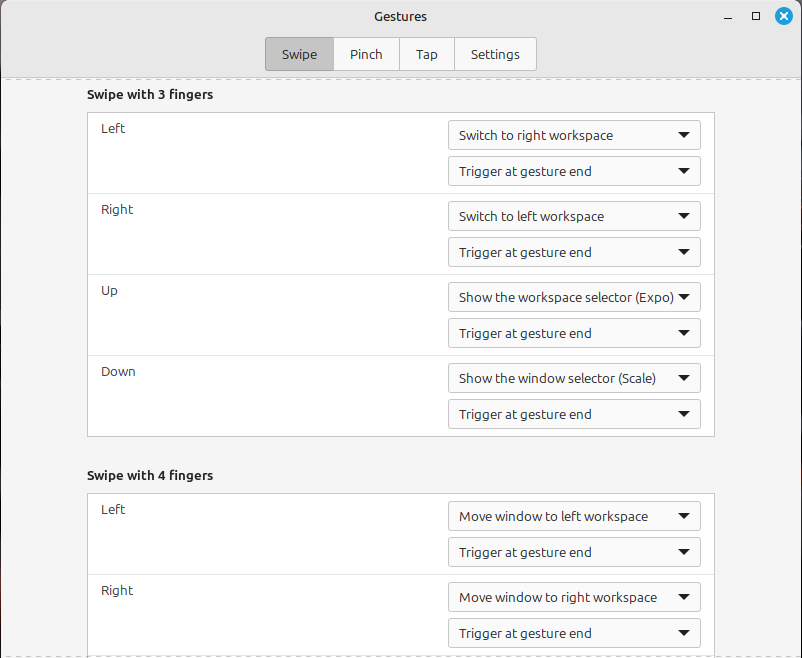
                Link Preview Image
                securitywriter@infosec.exchangeS 1 Reply Last reply
                0
                • R relay@relay.an.exchange shared this topic
                • securitywriter@infosec.exchangeS securitywriter@infosec.exchange

                  Linux brains…

                  You know how MacOS creates a workspace when you make an app full screen, and you can gesture with three fingers between them… is there a Linux equivalent? It probably has a pretentious name, but I don’t store them in the ol’ melon.

                  Windows’ implementation is terrible. So that’s the baseline.

                  I’ve seen workspaces in Linux for decades now, but it’s been pretty clunky comparatively. I can’t tell you how productive this really simple interaction makes me.

                  Some of it is likely down to the MacBook touchpads being the gold standard, but I do have a Lenovo one that isn’t terrible.

                  gllmr@social.gllmr.frG This user is from outside of this forum
                  gllmr@social.gllmr.frG This user is from outside of this forum
                  gllmr@social.gllmr.fr
                  wrote last edited by
                  #15
                  @SecurityWriter You can use 4 fingers ? I thinks it's implemented in gnome and KDE.
                  1 Reply Last reply
                  0
                  • securitywriter@infosec.exchangeS securitywriter@infosec.exchange

                    Linux brains…

                    You know how MacOS creates a workspace when you make an app full screen, and you can gesture with three fingers between them… is there a Linux equivalent? It probably has a pretentious name, but I don’t store them in the ol’ melon.

                    Windows’ implementation is terrible. So that’s the baseline.

                    I’ve seen workspaces in Linux for decades now, but it’s been pretty clunky comparatively. I can’t tell you how productive this really simple interaction makes me.

                    Some of it is likely down to the MacBook touchpads being the gold standard, but I do have a Lenovo one that isn’t terrible.

                    lascapi@social.tchncs.deL This user is from outside of this forum
                    lascapi@social.tchncs.deL This user is from outside of this forum
                    lascapi@social.tchncs.de
                    wrote last edited by
                    #16

                    @SecurityWriter
                    > MacOS creates a workspace when you make an app full screen

                    I like that but I don't know how to do that with #gnome or #kde unfortunately.

                    For the three fingers gesture, I guess it was not your main question and there is a lot of answer.

                    I didn't try to create a window rule with KDE, maybe it is possible to achieve that actually!! ( that's a #question for someone that use #plasma )

                    1 Reply Last reply
                    0
                    • securitywriter@infosec.exchangeS securitywriter@infosec.exchange

                      Linux brains…

                      You know how MacOS creates a workspace when you make an app full screen, and you can gesture with three fingers between them… is there a Linux equivalent? It probably has a pretentious name, but I don’t store them in the ol’ melon.

                      Windows’ implementation is terrible. So that’s the baseline.

                      I’ve seen workspaces in Linux for decades now, but it’s been pretty clunky comparatively. I can’t tell you how productive this really simple interaction makes me.

                      Some of it is likely down to the MacBook touchpads being the gold standard, but I do have a Lenovo one that isn’t terrible.

                      jon@activitypub.blankpad.netJ This user is from outside of this forum
                      jon@activitypub.blankpad.netJ This user is from outside of this forum
                      jon@activitypub.blankpad.net
                      wrote last edited by
                      #17

                      @SecurityWriter the window manager Niri is that if it was considered holistically alongside everything else rather than an afterthought made mostly to look nice.

                      1 Reply Last reply
                      0
                      • fishd@infosec.exchangeF fishd@infosec.exchange

                        @SecurityWriter @TheTomas The gesture works well, but Gnome doesn’t have the maximise-to-a-new-workspace feature as far as I know.

                        You might be able to make something using KWin in KDE … but it’d need to be handcrafted and there are some apps that don’t play well with KWin.

                        Signed, a Mac user who is also trying to switch to Linux.

                        thetomas@social.toot9.deT This user is from outside of this forum
                        thetomas@social.toot9.deT This user is from outside of this forum
                        thetomas@social.toot9.de
                        wrote last edited by
                        #18

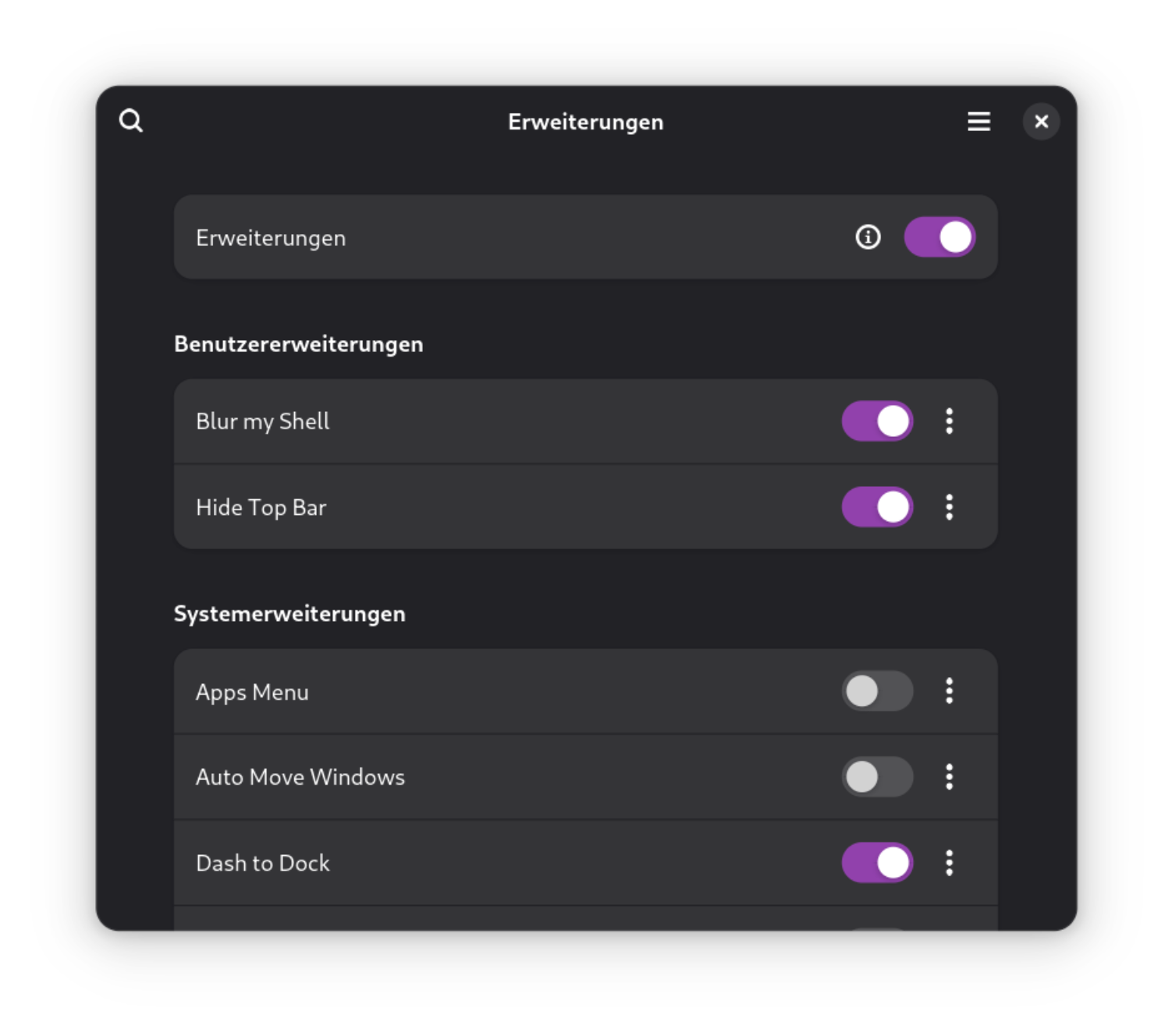
                        @Fishd @SecurityWriter Yep, but there's an Gnome Extension for this (I do not use it, just FYI)

                        Link Preview Image
                        Maximize To Workspace With History - GNOME Shell Extensions

                        favicon

                        (extensions.gnome.org)

                        These are the Extensions I am using:

                        Link Preview Image
                        1 Reply Last reply
                        0
                        • securitywriter@infosec.exchangeS securitywriter@infosec.exchange

                          Linux brains…

                          You know how MacOS creates a workspace when you make an app full screen, and you can gesture with three fingers between them… is there a Linux equivalent? It probably has a pretentious name, but I don’t store them in the ol’ melon.

                          Windows’ implementation is terrible. So that’s the baseline.

                          I’ve seen workspaces in Linux for decades now, but it’s been pretty clunky comparatively. I can’t tell you how productive this really simple interaction makes me.

                          Some of it is likely down to the MacBook touchpads being the gold standard, but I do have a Lenovo one that isn’t terrible.

                          gmthor@ioc.exchangeG This user is from outside of this forum
                          gmthor@ioc.exchangeG This user is from outside of this forum
                          gmthor@ioc.exchange
                          wrote last edited by
                          #19

                          @SecurityWriter try tiling and pop! os

                          Different workflows, but same ideas

                          1 Reply Last reply
                          0
                          • securitywriter@infosec.exchangeS securitywriter@infosec.exchange

                            Linux brains…

                            You know how MacOS creates a workspace when you make an app full screen, and you can gesture with three fingers between them… is there a Linux equivalent? It probably has a pretentious name, but I don’t store them in the ol’ melon.

                            Windows’ implementation is terrible. So that’s the baseline.

                            I’ve seen workspaces in Linux for decades now, but it’s been pretty clunky comparatively. I can’t tell you how productive this really simple interaction makes me.

                            Some of it is likely down to the MacBook touchpads being the gold standard, but I do have a Lenovo one that isn’t terrible.

                            roccorakete@troet.cafeR This user is from outside of this forum
                            roccorakete@troet.cafeR This user is from outside of this forum
                            roccorakete@troet.cafe
                            wrote last edited by
                            #20

                            @SecurityWriter there is FullScreenify for KDE Plasma, it does the the Fullscreen Thing. Touch Gestures should work oob.

                            1 Reply Last reply
                            0
                            • securitywriter@infosec.exchangeS securitywriter@infosec.exchange

                              Linux brains…

                              You know how MacOS creates a workspace when you make an app full screen, and you can gesture with three fingers between them… is there a Linux equivalent? It probably has a pretentious name, but I don’t store them in the ol’ melon.

                              Windows’ implementation is terrible. So that’s the baseline.

                              I’ve seen workspaces in Linux for decades now, but it’s been pretty clunky comparatively. I can’t tell you how productive this really simple interaction makes me.

                              Some of it is likely down to the MacBook touchpads being the gold standard, but I do have a Lenovo one that isn’t terrible.

                              cazabon@mindly.socialC This user is from outside of this forum
                              cazabon@mindly.socialC This user is from outside of this forum
                              cazabon@mindly.social
                              wrote last edited by
                              #21

                              @SecurityWriter

                              There's the actual multiple workspaces thing that's been around forever - not exactly like the Mac version, but lets you easily flip between different desktops / screens full of windows / whatever.

                              I use Cinnamon, so once you configure multiple workspaces, you can switch with ctrl-alt-left-arrow and -right-arrow. I don't recall if the hotkeys are different in Gnome or KDE or whatever, and I haven't used those in a decade or more, so I'd probably be wrong anyway - but every desktop at least used to support the same thing.

                              1 Reply Last reply
                              0
                              • musing_sys@social.fringesec.caM musing_sys@social.fringesec.ca
                                @SecurityWriter That sounds handy... went looking. Touchegg appears to be what you're looking for
                                https://www.baeldung.com/linux/touchpad-gestures
                                9lore@donotsta.re9 This user is from outside of this forum
                                9lore@donotsta.re9 This user is from outside of this forum
                                9lore@donotsta.re
                                wrote last edited by
                                #22

                                @musing_sys@social.fringesec.ca @SecurityWriter@infosec.exchange This looks very outdated. All functionality shown in the article is long since part of base gnome at this point.

                                1 Reply Last reply
                                0
                                • sheogorath@microblog.shivering-isles.comS sheogorath@microblog.shivering-isles.com

                                  @SecurityWriter Switchting between workspaces on GNOME works with the 3 finger gesture as well.

                                  Do you mean something else? Something that MacOS does, that is more than switching between Workspaces?

                                  securitywriter@infosec.exchangeS This user is from outside of this forum
                                  securitywriter@infosec.exchangeS This user is from outside of this forum
                                  securitywriter@infosec.exchange
                                  wrote last edited by
                                  #23

                                  @sheogorath yeah, MacOS makes full screen apps their own ‘workspaces’ but good to know the other piece is there.

                                  1 Reply Last reply
                                  0
                                  • musing_sys@social.fringesec.caM musing_sys@social.fringesec.ca
                                    @SecurityWriter oh, not having any reason to look previously... Linux Mint Cinnamon has it baked in apparently, just needs to be enabled
                                    Link Preview Image
                                    securitywriter@infosec.exchangeS This user is from outside of this forum
                                    securitywriter@infosec.exchangeS This user is from outside of this forum
                                    securitywriter@infosec.exchange
                                    wrote last edited by
                                    #24

                                    @musing_sys appreciated, I’ll have a look!

                                    1 Reply Last reply
                                    1
                                    0
                                    • R relay@relay.infosec.exchange shared this topic
                                    Reply
                                    • Reply as topic
                                    Log in to reply
                                    • Oldest to Newest
                                    • Newest to Oldest
                                    • Most Votes


                                    • Login

                                    • Login or register to search.
                                    • First post
                                      Last post
                                    0
                                    • Categories
                                    • Recent
                                    • Tags
                                    • Popular
                                    • World
                                    • Users
                                    • Groups